Bridge the gap between MRI classroom theory and clinical practice

The Corsmed MRI simulator builds real student confidence. Build courses, monitor student development, and prepare them for clinical success from Day One.

Corsmed interfaces showing the MRI simulator, Manage Courses, Grading of scan results, and User Progress analytics.

The MRI simulator that transforms theory into practice. Build courses, monitor student development, and prepare them for clinical success from Day One.

Corsmed interfaces showing the MRI simulator, Manage Courses, Grading of scan results, and User Progress analytics.

Trusted by leading MRI institutions

See the MRI learning platform demo

Every MRI program struggles to
bridge theory and practice

Traditional teaching methods fall short in two critical areas

Book icon

Textbooks alone can't bridge theory and practice

MRI physics is abstract. Students read equations and concepts, but they can't visualize how parameters actually affect real images. Theory remains disconnected from practice.

Hospital icon

Clinical placements have critical limitations

Limited scanner access. Inconsistent quality across sites. No time to experiment. Students watch more than they practice, and they only see routine scans on tight schedules.

The Corsmed MRI simulator:
Unlimited scanning practice 24/7

Give students freedom to experiment without patient pressure or scanner time limits. They can practice any anatomy or pathology 24/7 until they master it. They learn by trying, failing, and understanding.

"Before Corsmed, there was a big gap between didactic and clinical. Once we implemented Corsmed, that gap was bridged.

Now students learn MRI concepts in a safe space before they enter the higher-stakes clinical setting."

Ayman Darwish, MRI Instructor at NAIT
Ayman Darwish
MRI Instructor, Northern Alberta Institute of Technology
A laptop displaying Corsmed's MRI simulator interface. The screen shows three images of the brain, in axial, sagittal, and coronal planes, with pulse sequence settings being adjusted in the bottom panel.
Explore the MRI simulator
Back arrow icon
Explore the MRI simulator
Back arrow icon

How Corsmed bridges the gap

Four ways we turn classroom theory into clinical competency

1

Show abstract physics in action

When teaching TR, TE, and flip angles, demonstrate the exact results in real- time. No more imaginary scenarios; students see quantum physics concepts applied in medical practice.

"When teaching MRI physics, I don't have to rely on imaginary scenarios. I can show students the exact result when they apply physics concepts in a medical practice.

This visualization is the main part of Corsmed that helps me teach physics."

Zohreh Taghizadeh – MRI Program Specialist at CNI College
Zohreh Taghizadeh
MRI Program Specialist, CNI College
2

Students learn by doing – in a safe space

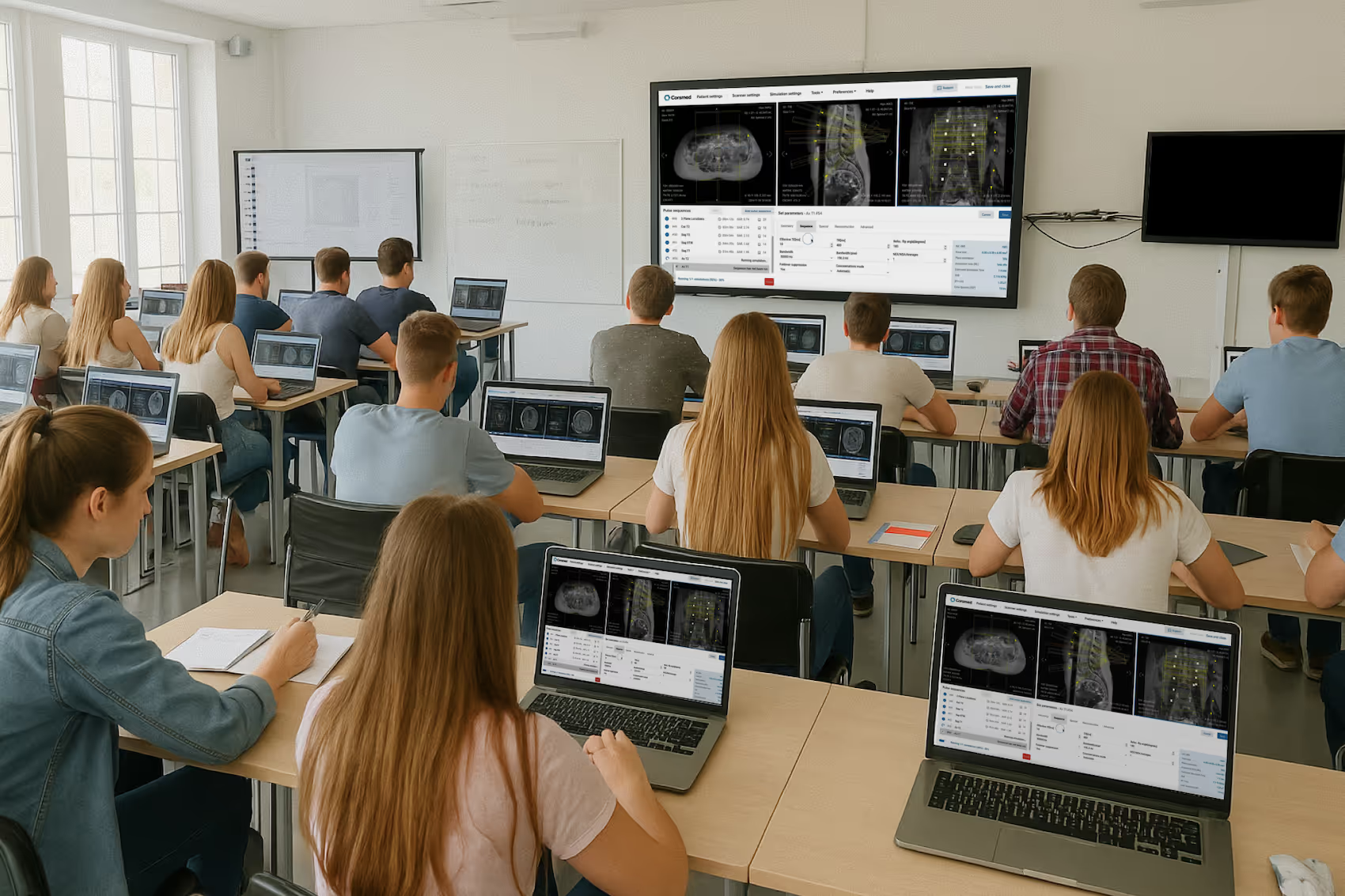
Give students freedom to experiment without patient pressure or scanner time limits. They can practice any anatomy or pathology 24/7 until they master it. Learn by trying, failing, and understanding.

"Corsmed gives students a safe space to learn, free from the pressures of clinical placement.

They can play with the settings, see what changes what, and understand how it affects the image – without worrying about patient care."

Samantha Mataka – Lecturer in Medical Science at University of Cumbria
Samantha Mataka
Lecturer in MRI & Medical Imaging, University of Cumbria
College students practicing on Corsmed's MRI simulator in a classroom
3

Assign hands-on scan exercises

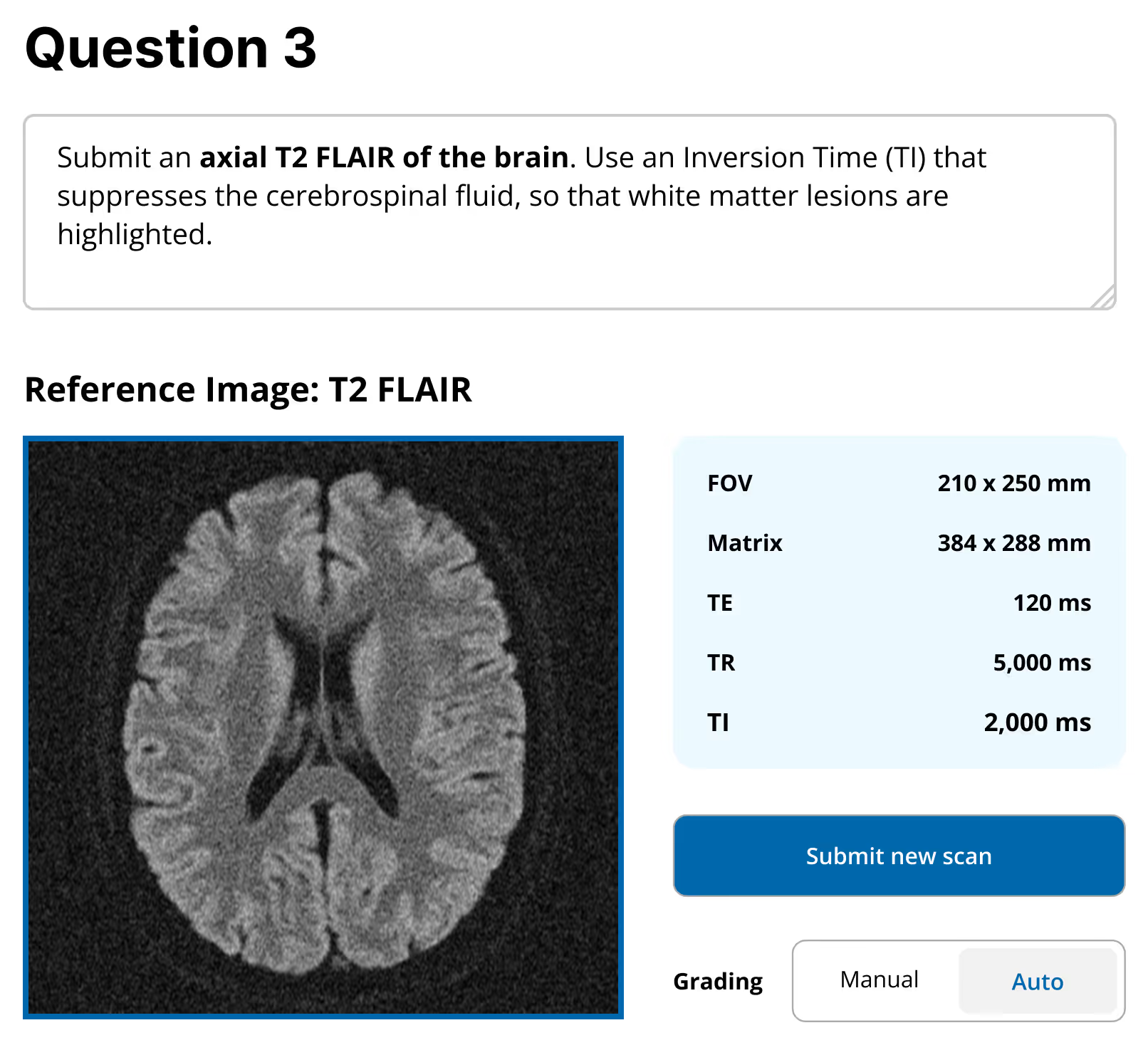
Create scanning assignments where students practice real protocols across diverse anatomies and pathologies. They complete hundreds of cases before their first clinical day.

"Using Corsmed, our students complete 500 clinical cases across a wide range of anatomies and pathologies.

When our students began their externships, the imaging centers were amazed at how skilled they were."

Mahmud Khokhar – AoS MRI Program Director at CNI College
Dr. Mahmud Khokhar
AoS MRI Program Director, CNI College
Corsmed's submit scan exercise. This exercise asks students to submit an axial T2 FLAIR brain scan with specific parameters. The interface displays a reference T2 FLAIR brain image showing white and gray matter contrast, alongside technical parameters including FOV (210 x 250 mm), Matrix (384 x 288 mm), TE (120 ms), TR (5,000 ms), and TI (2,000 ms). A blue 'Submit new scan' button and grading options (Manual/Auto) are visible below the parameters.
4

Assess skills and track student progress

Monitor practical competency with automatic grading, personalized feedback, and detailed analytics. See exactly what parameters students entered, how they prescribed planes, and track their skill development over time.

"Corsmed is an excellent assessment tool because students build protocols and sequences from scratch.

It shows exactly what parameters they've entered and how they've prescribed planes, which helps us test their understanding in many areas."

Ray Lee – MRI Program Director at British Columbia Institute of Technology
Ray Lee
MRI Program Director, BCIT
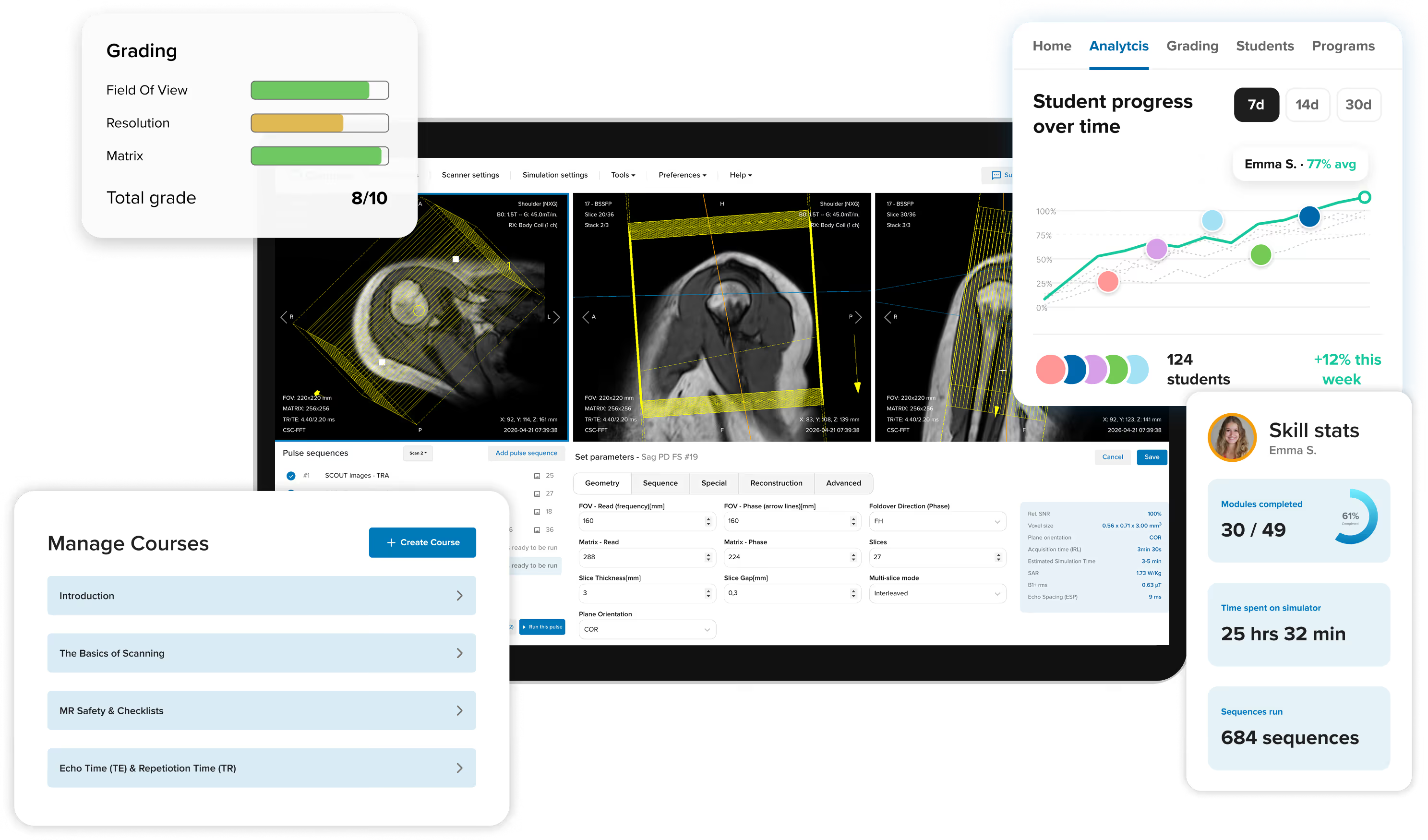
Corsmed interface showing an automatic grading for a submitted scan. On the left are grades for six parameters, including Field of View, Resolution, and Matrix. On the right are three speech bubbles with detailed feedback.
Corsmed interface showing User Progress analytics. On the left, a line graph shows MRI skills for four students trending upward. On the right, analytics for a specific user, including course modules completed, time spent on simulator, and number of sequences run.

The complete learning management system built around the simulator

Corsmed is not just a simulator. It's a complete training platform with all the features you need to teach MRI effectively: course creation, scan exercises, grading, progress tracking, user management, and skill certificates.

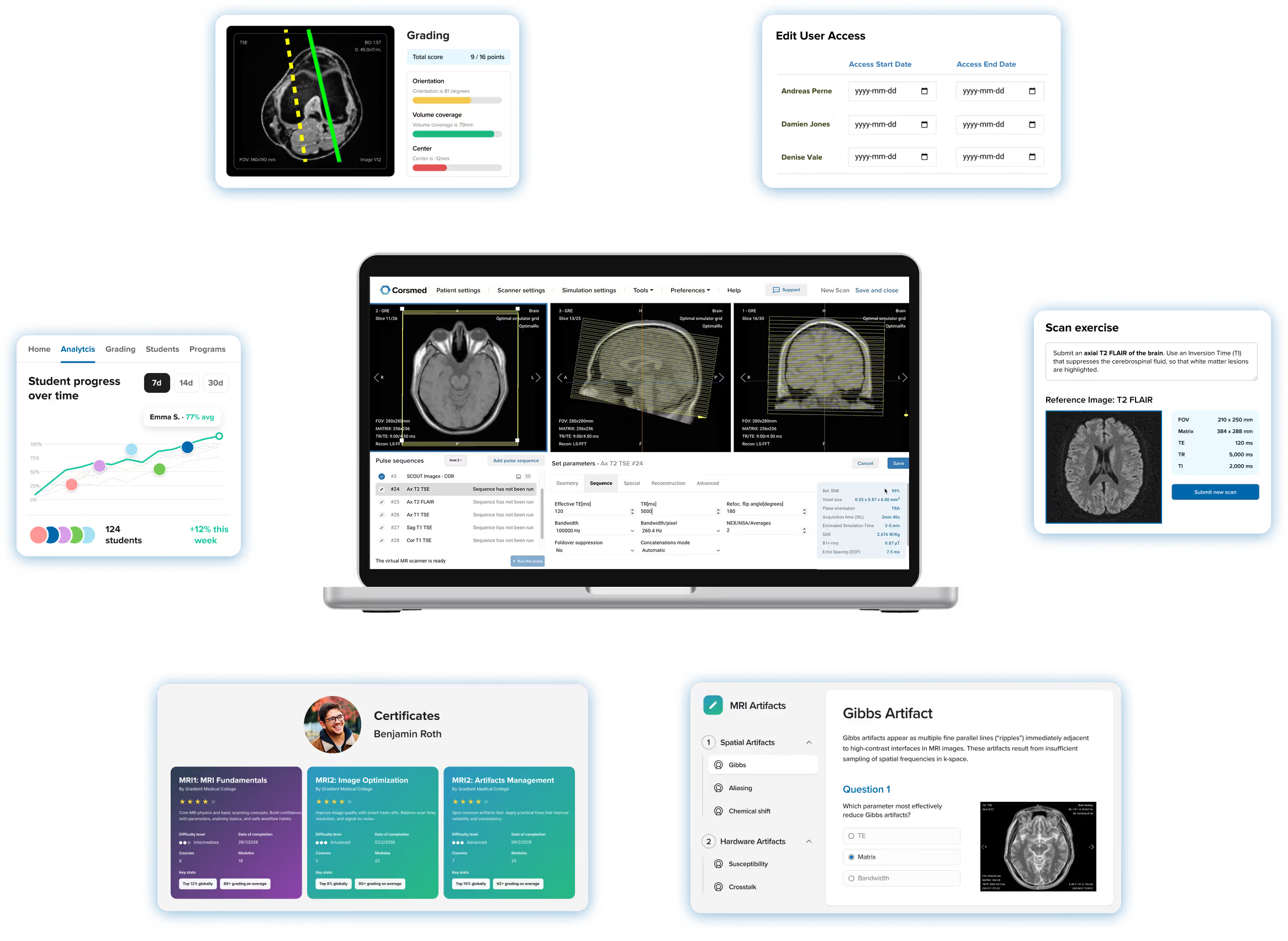
Screenshot of Corsmed's training platform showing the MRI simulator at the center of a laptop screen, surrounded by all the features you need to teach effectively, including course modules, scan exercises, automated grading, student analytics, user achievements page, and user access management.
Explore the LMS
Back arrow icon

Tools that help your students master every part of MRI

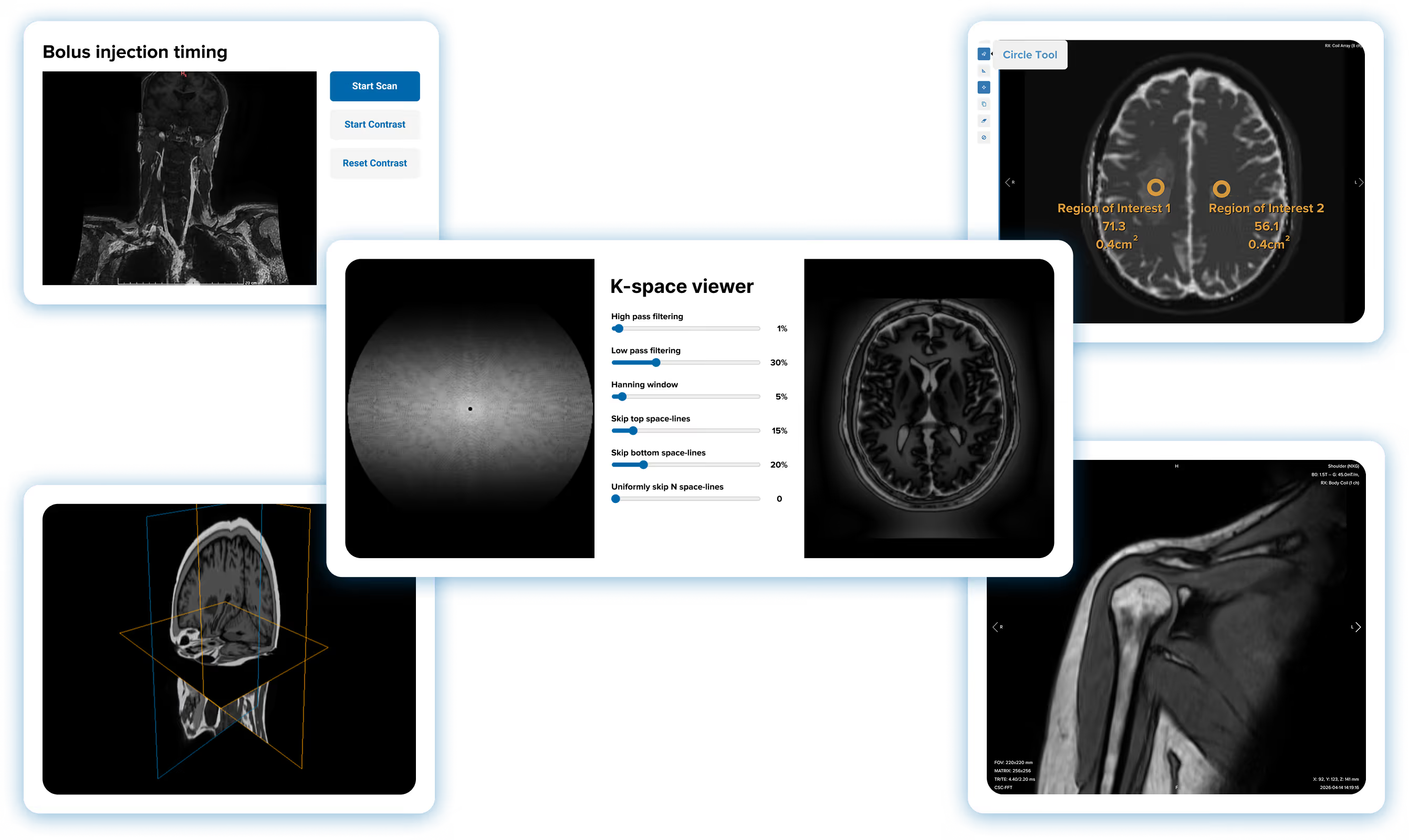
In addition to the core simulator, Corsmed offers five additional tools that help your students master every aspect of MRI scanning: timing contrast injections, grasping k-space, viewing anatomy in 3D, post-processing, and image review.

A collage of screenshots from Corsmed's MRI training platform showing five imaging tools placed around the MRI simulator: 1) the k-space viewer, 2) the bolus injection timing tool, 3) the 3D viewer showing a rotatable brain model, 4) the post-processing tool with a circular ROIs drawn on a brain scan, and 5) the DICOM viewer showing a shoulder scan
Explore the imaging tools
Back arrow icon

Trusted by leading MRI programs

Colleges and hospitals worldwide use Corsmed to bridge the theory-practice gap

Getting started is simple

Transform your MRI program in 3 straightforward steps

1

See Corsmed in action

Book a personalized demo where we'll show you exactly how Corsmed fits your program's needs and answer all your questions.
2

Launch with expert support

Our team provides hands-on onboarding. We'll help you set up courses, create exercises, and onboard your students. You're never on your own.
3

Build job-ready graduates

Students practice, you track progress and assign grades. Watch them transform from uncertain learners into confident MRI professionals.

You're never on your own

Free expert support and an intuitive platform built for educators

Easy to set up and use

  • Intuitive course builder with drag-and-drop blocks
  • Pre-built course library to get started immediately
  • Automatic grading saves hours of manual work
  • Students can access Corsmed from any laptop – no special equipment needed

World-class support team

  • 24-hour response time via email and chat
  • Free support calls whenever you need help
  • Team of 25+ MRI experts ready to assist
  • Personal onboarding over video call

Ready to bridge the gap?

See how Corsmed can transform your MRI program and prepare job-ready graduates.

Try for free
Contact us

Frequently asked questions

Does it actually simulate a real MRI scanner accurately?

Yes, and we're the only simulator that does. Most simulators use image libraries: you change a parameter, the image stays the same. Corsmed generates images the same way real scanners do, so every parameter change produces the correct visual effect.

That means students learn real cause-and-effect relationships, not button sequences. What they practice on Corsmed is what they'll see in a real clinic.

Is it vendor-neutral, or tied to one scanner manufacturer?

Fully vendor-neutral. Corsmed teaches universal MRI principles that apply across all major manufacturers: Siemens, GE, Philips, Canon, and others. Students learn MRI physics and concepts, not button positions on a specific console. This is especially useful if you operate scanners from multiple vendors.

Noyal Mathew, MRI Practice educator at University College London Hospitals NHS, especially applauded the vendor-neutral design of Corsmed:

"It's very important that the MRI simulator has a vendor-neutral design. Especially for us at UCLH, where we have many different scanners.

The vendor neutral interface also helps when teaching. I can focus on explaining how the physics work, rather than the placements of buttons.”

Noyal Mathew

Noyal Mathew

MRI Practice Educator, NHS UCLH

How is this different from ScanLabMR?

Corsmed is more accurate and comprehensive. We're built on actual MRI physics equations, not approximations.

When you change inputs on ScanLabMR, you rarely get the same exact image as you'd have gotten on a real scanner.

When you change any input on Corsmed (sequence, parameter, hardware, patient, anatomy, motion, pathology, positioning or slice angling), you get exactly what you'd see on a real scanner. You see all the effects, including contrast, resolution, SNR, scan time, SAR, CNR, and artifacts.

Artifacts, especially, is a critical part of mastering MRI scanning, and something only Corsmed can simulate accurately. Use wrong slice planning or parameters on Corsmed, and you'll see artifacts just like a real scanner would, including:

  1. Motion ghosting
  2. Wrap (aliasing)
  3. Gibbs
  4. Chemical shift
  5. Noise
  6. Turbo blurring
  7. Partial volume
  8. Susceptibility
  9. Geometric distortion
  10. Nyquist ghosting
  11. Blooming artifact on T2*
  12. Magic angle
  13. Respiratory
  14. Cross-talk

...And many more.

With Corsmed, you can trust that you learn real scanning skills.
What you see on the simulator is what you'll see in a real clinic with a real scanner.

Many organizations have switched from ScanLabMR to Corsmed for this reason, including Forsyth Technical Community College and Imperial College Healthcare NHS Trust.

Are there pre-built courses, so we don't have to build our own from scratch?

Yes. The Corsmed catalog includes 10 pre-built programs covering physics fundamentals, sequence parameters, artifact management, cardiac imaging, and clinical applications:

  1. Introduction to the Corsmed MRI Simulator Interface (9 learning modules)
  2. Safety in MRI (6 learning modules)
  3. Cross Sectional Anatomy (8 learning modules)
  4. MRI Clinical Cases (49 learning modules)
  5. MRI Fundamentals (11 learning modules)
  6. MRI Image Optimisation (12 learning modules)
  7. MRI Protocols: Basic (11 learning modules)
  8. Cardiovascular Magnetic Resonance (15 learning modules)
  9. MRI Artifacts Management (9 learning modules)
  10. MRI Clinical Applications (29 learning modules)

You can use these as-is, or duplicate and customize them for your curriculum.

Most programs start with the catalog and adapt from there, which saves considerable setup time.

Do we have to use your pre-built courses, or can we build our own?

Both options are available. The Corsmed catalog includes pre-built programs covering physics fundamentals, sequence parameters, artifact management, cardiac imaging, and clinical applications. You can use these as-is, or duplicate and customize them for your curriculum.

You can also build courses entirely from scratch. The module builder supports text, images, videos, files, DICOMs, multiple-choice questions, freeform writing questions, and scanning exercises, in any order and combination.

Most programs start with the catalog and adapt from there, which saves considerable setup time.

How do scanning assignments and grading work?

You set a scan task. Students then complete it on the simulator and submit their images as the answer. When they submit, you see not just the resulting image stack, but every parameter and slice position they used to produce it.

Grading can be automatic or manual.

With auto-grading, you perform a reference scan on the simulator yourself. That image becomes the benchmark. Corsmed then automatically compares each student's submission against it and assigns points based on how close they got. A near-perfect result earns full marks. Students get instant feedback without you reviewing every scan individually.

Example of a reference image on an auto-graded scan exercise:
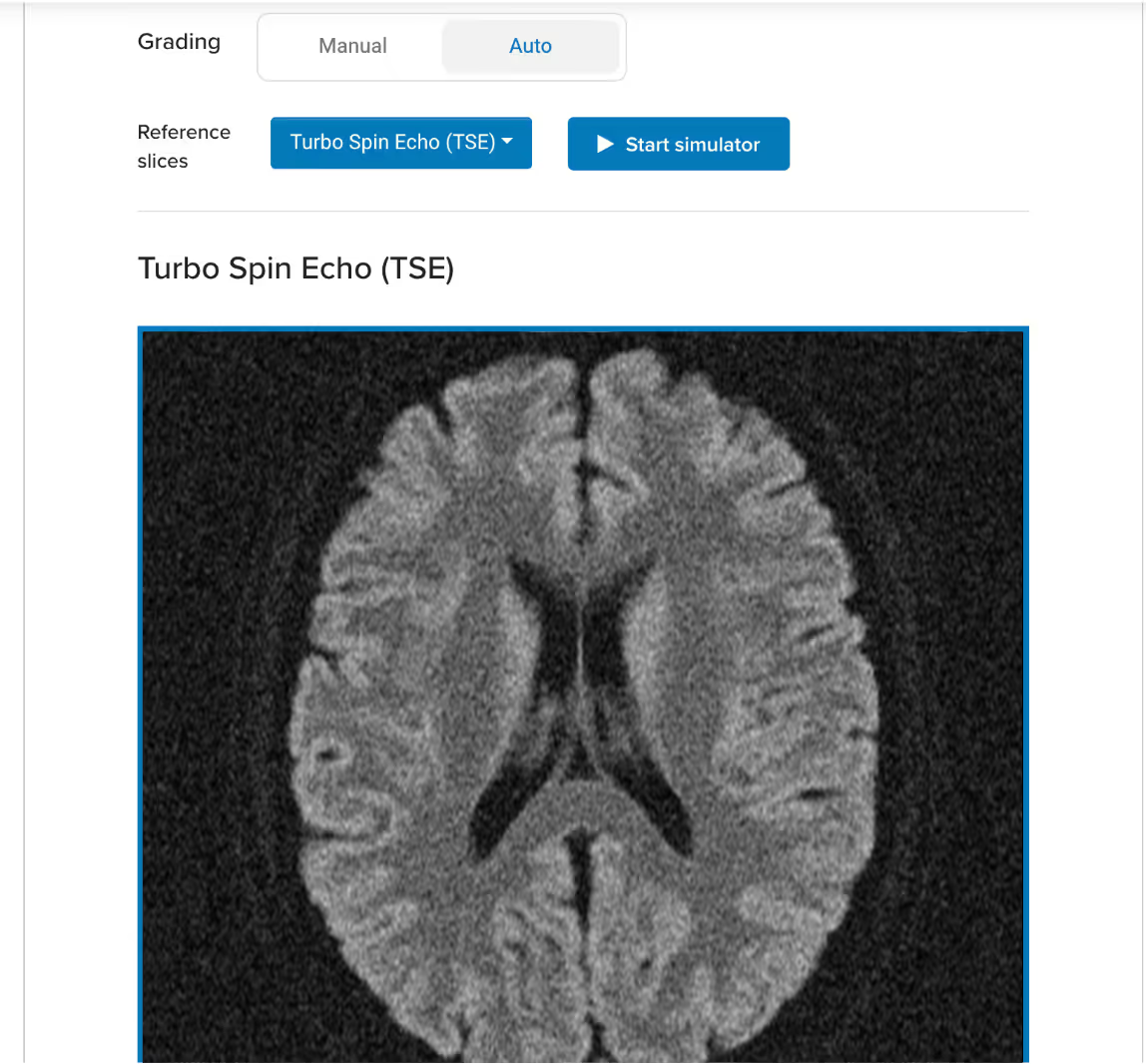
Corsmed UI: a scan assignment block that uses auto-grading, teacher has uploaded an axial T2 TSE of a brain as reference image

Example of an auto-graded scan:

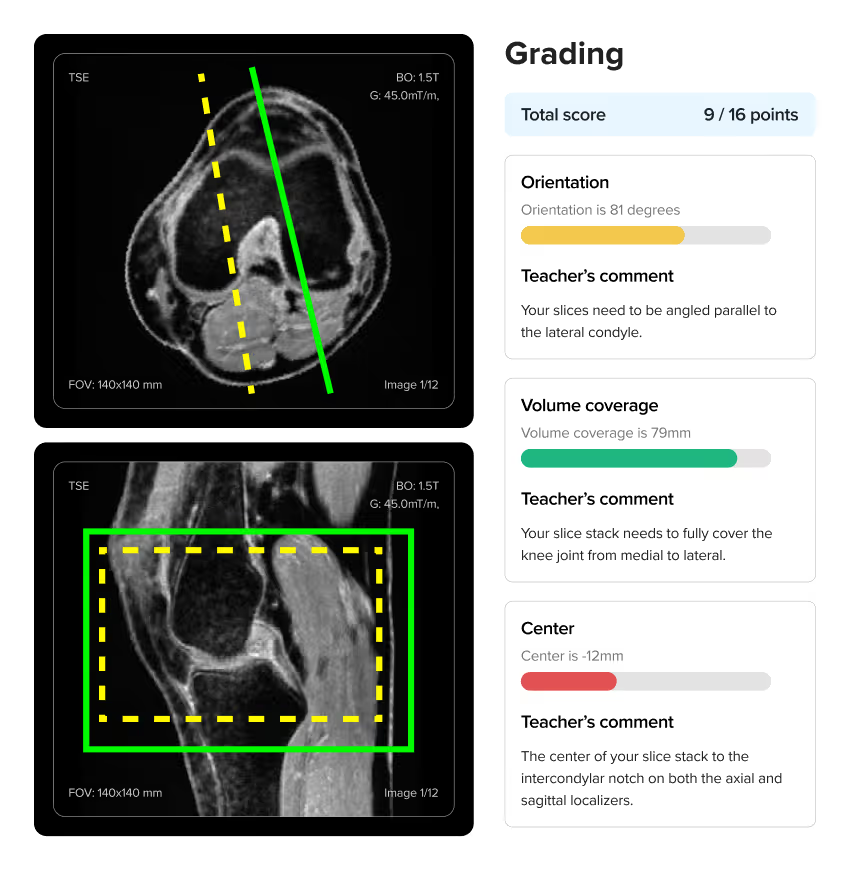
Screenshot of Corsmed's automated grading panel for a knee MRI exercise, showing a student's slice planning scored at 9 out of 16 points with instant feedback on orientation, volume coverage, and centering.

When using auto-grading, you can also specify how the platform should assess students' scans:

  1. What should be assessed:Parameters, slice planning, or both
  2. How strict or lenient the grading should be:The more lenient, the more a student's image can deviate from the reference while still earning a full score.

Corsmed's auto-grading functionality:

Screenshot of Corsmed's auto-grading functionality, showing two button groups. The first button group lets you choose what should be assessed (parameters, slice planning or both), and the second button group lets you choose how strict or lenient the grading should be (Low, Normal or High).

With manual grading, you review each submission yourself and write feedback directly on it, noting exactly what the student got right and what to correct. Students see your annotations alongside their scan.

How does user and cohort management work?

You group students into cohorts and assign each cohort its own programs. Different classes, intakes, or departments can have access to different courses without any overlap.

You can also set time-bounded access, controlling when a course unlocks and when it expires. If a student joins late or needs extended access, you adjust that individually without affecting the rest of the group.

Individual access can be customized down to a single user when needed.

We already use Canvas / Moodle / Blackboard / Brightspace.
Does Corsmed integrate with those?

Yes. Corsmed integrates directly with Canvas, Moodle, Blackboard, and Brightspace. Students access the simulator and scan assignments without leaving your existing platform.

If you prefer to run everything through Corsmed's own LMS, you can do that too. Either way, there's no disruption to your current setup.

How long does setup and onboarding take?

Most programs are up and running within a week. Corsmed is cloud-based, so there's no hardware to install and no IT configuration required. Users access everything through a web browser.

We provide onboarding sessions to help you structure your training program, drawing on what's worked at other hospitals and colleges. You're not building from scratch.

NHS UCLH found that a 1-hour introduction is enough for radiographers to begin practicing independently after that.

Is it difficult to set up and integrate into our training program?

No, setup is extremely simple. Corsmed works on any computer with an internet connection. There's no software to install, no special hardware to buy, and no IT configuration required. Users just log in and access it through a web browser.

NHS UCLH found that a 1-hour introduction is enough for radiographers to begin practicing independently.

"It's straightforward: press 'Scan' and it scans. Click 'Add protocol' and it adds a protocol.

A 1-hour introduction enables our learners to explore independently. There are good video guides within the 'Help' page too."

Noyal Mathew

Noyal Mathew

MRI Practice Educator, NHS UCLH

Even non-technical users learn to use Corsmed very quickly.

"One of our students wasn't very tech-savvy. She needed IT support just to upload her coursework. But she mastered Corsmed, which shows how user-friendly the simulator is."

Dr. Mahmud Khokhar

Dr. Mahmud Khokhar

MRI Program Director, CNI College

Will our students and technologists actually use it, or will it sit unused?

Yes, when integrated correctly. Usage depends heavily on how the simulator is introduced into your program.

NHS UCLH found that structured group sessions work best: learners practice together with an educator present for real-time feedback. When used in formal training sessions with clear exercises and learning objectives, engagement is strong. We share best practices from successful programs to help you get that right from the start.

How do we know if users are actually progressing?

The analytics dashboard gives you a live view of your whole cohort. Module completion, time spent on the simulator, scan count, and grades for every student are visible at a glance.

You can drill into any individual to see exactly where they are in the curriculum and which exercises they've completed. In a self-paced program, this lets you catch who is falling behind before it becomes a problem.

What if we run into technical issues or need help?

You get full support. Every account includes direct access to our support team and built-in help resources, including workflow videos and guides.

We also offer onboarding sessions to help you structure your training program around the simulator, based on what has worked for other hospitals and colleges. You are never on your own.