Your complete MRI teaching platform—
from classroom to clinical mastery

Every tool you need to teach MRI effectively, built around the world's only clinical-grade MRI simulator.

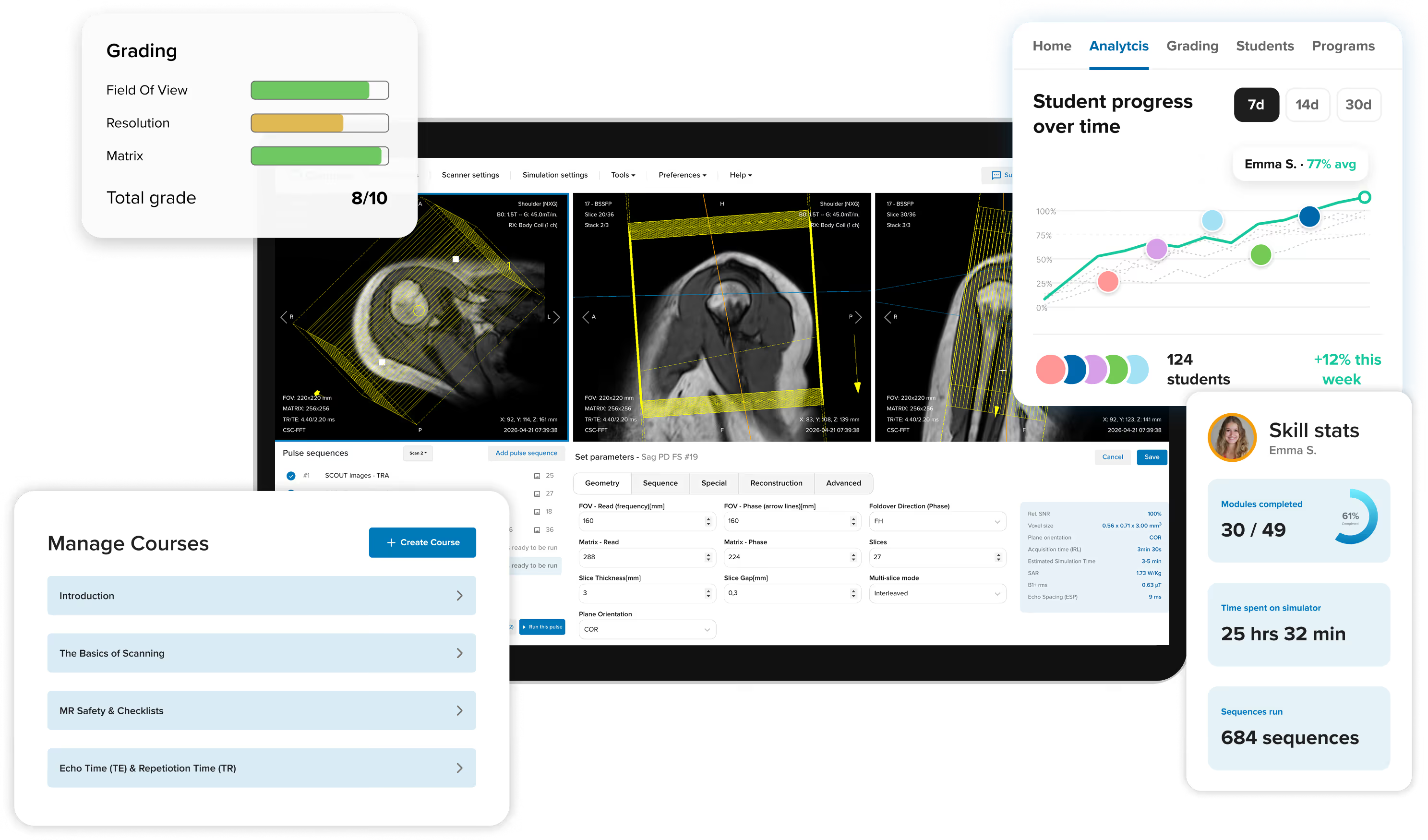
Corsmed interfaces showing the MRI simulator, Manage Courses, Grading of scan results, and User Progress analytics.

Every tool you need to teach MRI effectively, built around the world's only clinical-grade MRI simulator.

Corsmed interfaces showing the MRI simulator, Manage Courses, Grading of scan results, and User Progress analytics.

Trusted by leading MRI institutions

The Corsmed MRI simulator:
Unlimited scanning practice 24/7

Give students freedom to experiment without patient pressure or scanner time limits. They can practice any anatomy or pathology 24/7 until they master it. They learn by trying, failing, and understanding.

"Before Corsmed, there was a big gap between didactic and clinical. Once we implemented Corsmed, that gap was bridged.

Now students learn MRI concepts in a safe space before they enter the higher-stakes clinical setting."

Ayman Darwish, MRI Instructor at NAIT
Ayman Darwish
MRI Instructor, Northern Alberta Institute of Technology
A laptop displaying Corsmed's MRI simulator interface. The screen shows three images of the brain, in axial, sagittal, and coronal planes, with pulse sequence settings being adjusted in the bottom panel.
Explore the MRI simulator
Back arrow icon
Explore the MRI simulator
Back arrow icon

Everything you need to run a complete MRI program – built around the simulator

A complete training platform with unlimited MRI practice at its core. Every tool surrounding the simulator is built specifically to help you organize course materials, create scanning exercises, manage users, grade assignments, and track progress.
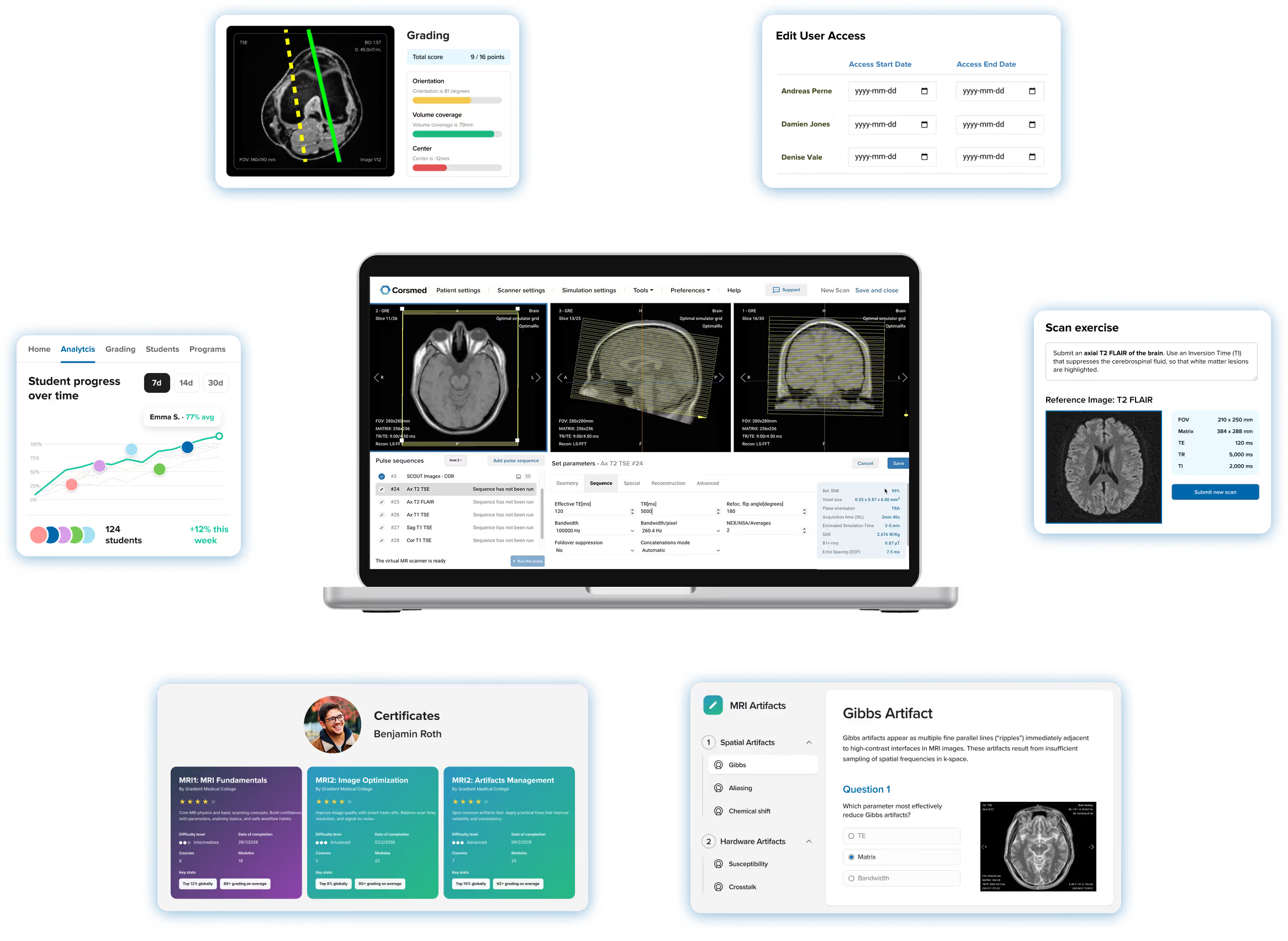
Screenshot of Corsmed's training platform showing the MRI simulator at the center of a laptop screen, surrounded by all the features you need to teach effectively, including course modules, scan exercises, automated grading, student analytics, user achievements page, and user access management.

See the MRI learning platform demo

Organize your curriculum exactly the way you teach it

Your MRI program is not like every other program. You need an LMS that organizes around your content, not one that locks you into a rigid format.

Corsmed's LMS is a fully flexible hierarchy: Programs, Courses, Modules, and Assignments in any configuration you need. You can have one short course or a multi-year curriculum with dozens of modules. The structure follows your program.

"Building custom courses is extremely helpful. I need a solid structure to give my undergrads clear direction.

The module building is easy to use, and lets me organize the content exactly as I need it."

Samantha Mataka – Lecturer in Medical Science at University of Cumbria
Samantha Mataka
Lecturer in MRI & Medical Imaging, University of Cumbria
Screenshot of Corsmed's LMS course builder, showing two training programs side by side: one long program with 3 courses, 12 modules and 24 assignments, and one short program with just 1 course and 2 modules, illustrating how the platform adapts to programs of any size and structure.

Create courses with any type of content, format and order

Screenshot of a Corsmed learning module, showing a lesson combining text, images, an explainer video, downloadable case studies, and a quiz question asking which parameter best reduces gibbs artifacts.

Students should move through your content the way you'd teach it in person.

Our course module builder gives you full flexibility, with all types of content blocks:

Content blocks:

  1. Text
  2. Images
  3. Videos and GIFs
  4. Files
  5. DICOMs
  6. Simulator exercises

Assignment blocks:

  1. Scanning exercises
  2. Multiple-choice questions
  3. Freeform writing questions

Combine these blocks in whatever order makes sense. Modules can be as brief or as deep as you need.

Embed multiple-choice quizzes, freeform writing questions, and scanning exercises anywhere alongside the content.

Scan exercises: Assess your students' hands-on scanning skills

Your students need to practice on specific cases, and you need a way to set those exercises and review the results.

With Corsmed's scanning assignments, you task students to perform a specific scan on the simulator. They submit their image as the answer. You see the result and every parameter they used to produce it.

"Using Corsmed, our students complete 500 clinical cases across a wide range of anatomies and pathologies.

When our students began their externships, the imaging centers were amazed at how skilled they were."

Mahmud Khokhar – AoS MRI Program Director at CNI College
Dr. Mahmud Khokhar
AoS MRI Program Director, CNI College
Screenshot of a Corsmed scan exercise, asking the student to produce an axial T2 FLAIR brain scan with the correct parameters to suppress cerebrospinal fluid and highlight white matter lesions.

Grade assignments and give feedback

Use automatic grading…

You may not have time to review every scan your students submit.

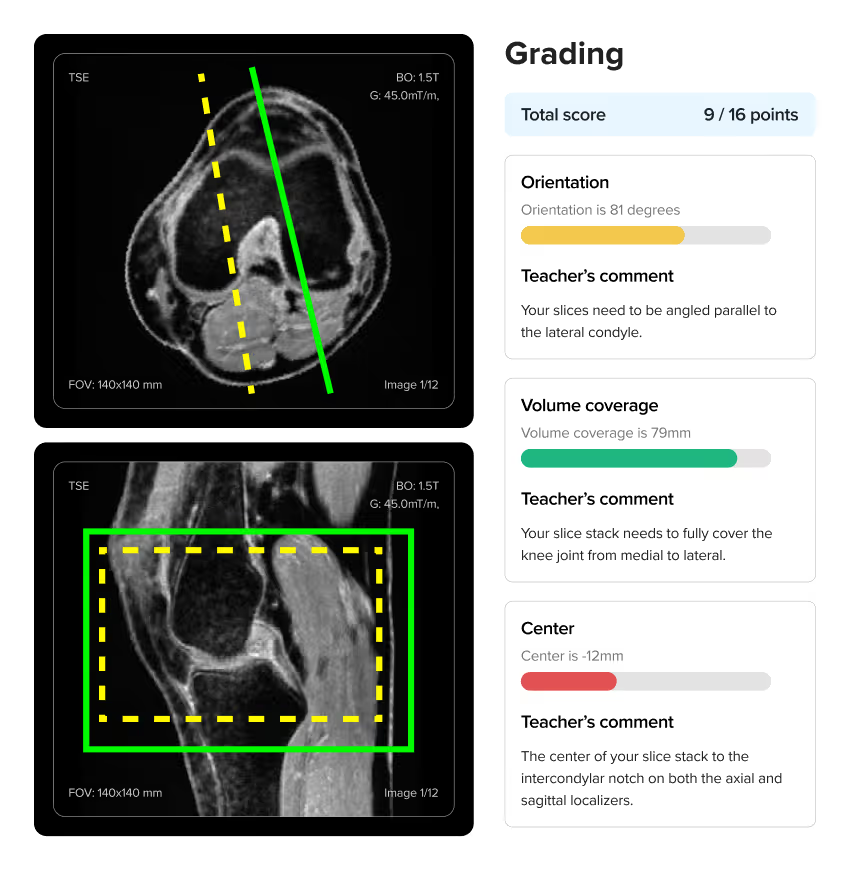
Corsmed lets you auto-grade everything. Set a reference image, and the platform evaluates every submission relative to that reference – its position, coverage, FOV, resolution, and parameters. Students get instant feedback without you reviewing a single scan.

"Corsmed is an excellent assessment tool because students build protocols and sequences from scratch.

It shows exactly what parameters they've entered and how they've prescribed planes, which helps us test their understanding in many areas."

Ray Lee – MRI Program Director at British Columbia Institute of Technology
Ray Lee
MRI Program Director, BCIT
Screenshot of Corsmed's automated grading panel for a knee MRI exercise, showing a student's slice planning scored at 9 out of 16 points with instant feedback on orientation, volume coverage, and centering.
Screenshot of a Corsmed cardiac MRI exercise, showing a student's slice planning on two localizer views alongside their scan parameters and an instructor's written feedback.

…Or give individual feedback

Some scans need more than a score and general feedback.

Write directly on any submission, and point out exactly what the student got right, what's off, and what to fix next time. They see your notes alongside their scan, not buried in a gradebook.

"With the simulator, assessment is easier. Radiographers can perform a scan whenever it suits them, and I can review their work later."

Noyal Mathew – MRI Practice Educator at NHS University College London Hospitals
Noyal Mathew
MRI Practice Educator, University College of London Hospitals NHS Trust

Always know where every student stands – analytics across your whole program

In a self-paced program, students can fall behind before anyone notices. You need visibility into who is progressing, who is struggling, and who is ready for the next step.

Corsmed's analytics dashboard gives you a live view of your whole cohort: module completion, time on the simulator, scan count, and grades for every student.

Drill into any individual to catch who needs support before it becomes a problem.

Screenshot of Corsmed's instructor analytics dashboard, showing student progress over time, with top and underperforming students highlighted by name and average score.

Control exactly who accesses what – and when

Group users into cohorts

Different classes and cohorts may need access to different courses.

Corsmed lets you group students into cohorts, and assign each group its own programs. You can even customize access down to the individual student.

Corsmed interface showing Edit User Access, where different user cohorts have access to different courses.

Set time-bounded access

Not every student should be on the same schedule. Some cohorts start at different points in the year, and some should only get access when prerequisites are met.

With Corsmed, you can set start and end dates so content and simulator access unlocks on your schedule. Adjust individual access without affecting the rest of the group.

Corsmed interface showing time-bound course access, with different start and end dates for each user.

Start teaching with ready-made courses from the Corsmed catalog

Building a complete MRI curriculum from scratch takes time you may not have before your first class.

The Corsmed catalog includes pre-built programs covering the core MRI curriculum:

  1. Physics fundamentals
  2. Sequence parameters
  3. Artifact management
  4. Advanced protocols
  5. Cardiac imaging
  6. Clinical applications

‍…And many more.

Use them as is, duplicate and customize them for your program, or build your own from scratch.

Screenshot of Corsmed's pre-built program catalog, showing 12 ready-made MRI courses ranging from beginner topics like MRI Fundamentals and Safety in MRI to advanced programs covering Cardiac MRI, Artifacts Management, and Clinical Applications.

Send graduates into the job market with proof of competency

When your students enter the job market, they need more than a transcript. Employers want to know what they've actually practiced.

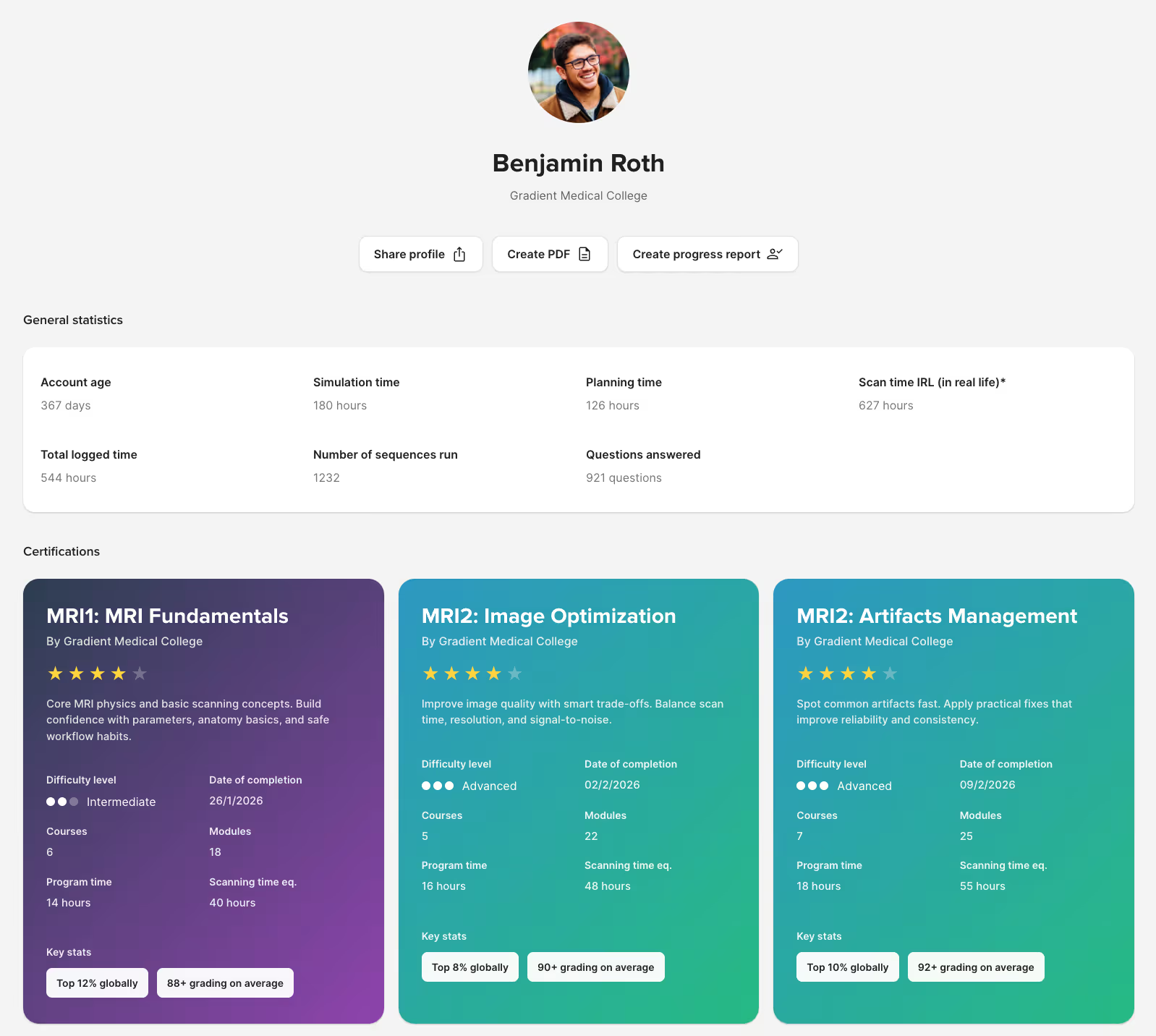
As students complete programs on Corsmed, the platform automatically builds their achievement profile: programs completed, certificates earned, simulator usage, etc. The profile is downloadable and shareable.

"One of our graduates was hired by a prestigious hospital that focuses solely on cardiac imaging. Thanks to Corsmed, he was fully prepared."

Mahmud Khokhar – AoS MRI Program Director at CNI College
Dr. Mahmud Khokhar
AoS MRI Program Director, CNI College
Corsmed student digital resume displaying MRI course certifications and performance stats like simulation hours, planning time, and sequences completed.

Integrate with Canvas, Moodle, Brightspace or Blackboard

If your institution already runs an LMS, Corsmed works alongside it.

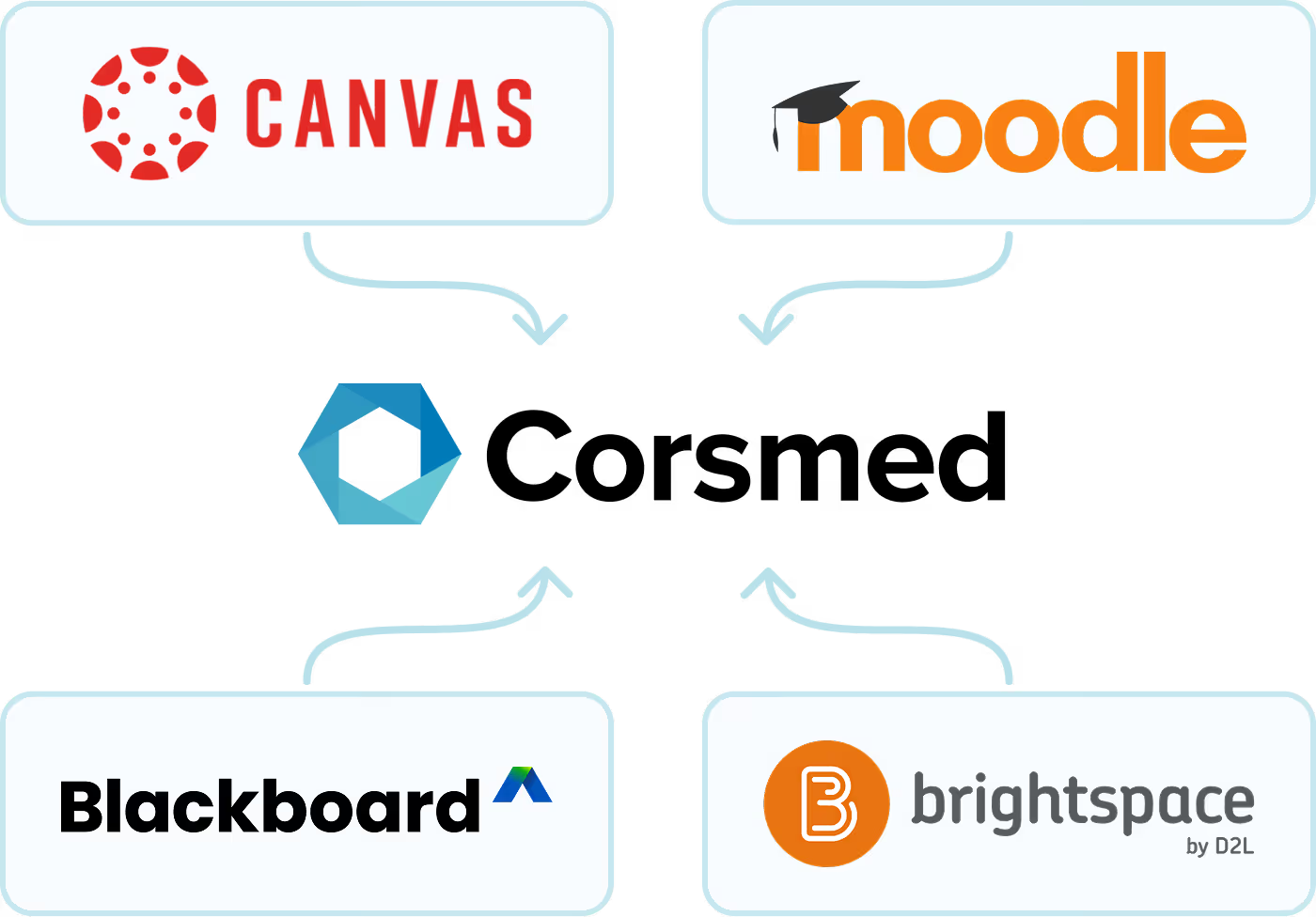
Connect Corsmed to your existing platform and give students access to the simulator and scan assignments without disrupting your current setup. Integrates with:

  • Canvas
  • Moodle
  • Blackboard
  • Brightspace
Diagram showing the Corsmed simulator integrating with four major learning management systems – Canvas, Moodle, Blackboard, and Brightspace – via Learning Tools Interoperability (LTI).

Easy setup: Students learn to scan in minutes, no IT headaches

Introducing new educational technology can be daunting if it frustrates students and requires constant technical support.

Corsmed solves this with a highly user-friendly design where parameters are clearly laid out. Learners can jump right into scanning after just a brief introduction

The platform works on any laptop; all you need is an internet connection. No software installations or special hardware required.

"It's straightforward: press 'Scan' and it scans. Click 'Add protocol' and it adds a protocol.

A 1-hour introduction enables our learners to explore independently. There are good video guides within the 'Help' page too."

Noyal Mathew – MRI Practice Educator at NHS University College London Hospitals
Noyal Mathew
MRI Practice Educator, University College London Hospitals NHS Foundation Trust

World-class support that never leaves you hanging

"Every feature we requested, we worked like a team. The Corsmed staff were there whenever we needed them.

Sometimes I contact Corsmed 20-30 times a day. You send one email and get a response right away."

Zohreh Taghizadeh – MRI Program Specialist at CNI College
Zohreh Taghizadeh
MRI Program Specialist, CNI College

You need more than just an MRI simulator and LMS; you need an educational partner invested in your students' success.

With Corsmed, you get lightning-fast customer service. We step in to solve problems the moment you send an email.

And we don't just fix immediate issues; we listen to your feedback and continuously build new features to help you teach better.

Trusted by leading MRI programs

Colleges and hospitals worldwide use Corsmed to bridge the theory-practice gap

Get started today

Join the institutions and hospitals already practicing with Corsmed.

Frequently asked questions

Does it actually simulate a real MRI scanner accurately?

Yes, and we're the only simulator that does. Most simulators use image libraries: you change a parameter, the image stays the same. Corsmed generates images the same way real scanners do, so every parameter change produces the correct visual effect.

That means students learn real cause-and-effect relationships, not button sequences. What they practice on Corsmed is what they'll see in a real clinic.

Is it vendor-neutral, or tied to one scanner manufacturer?

Fully vendor-neutral. Corsmed teaches universal MRI principles that apply across all major manufacturers: Siemens, GE, Philips, Canon, and others. Students learn MRI physics and concepts, not button positions on a specific console. This is especially useful if you operate scanners from multiple vendors.

Noyal Mathew, MRI Practice educator at University College London Hospitals NHS, especially applauded the vendor-neutral design of Corsmed:

"It's very important that the MRI simulator has a vendor-neutral design. Especially for us at UCLH, where we have many different scanners.

The vendor neutral interface also helps when teaching. I can focus on explaining how the physics work, rather than the placements of buttons.”

Noyal Mathew

Noyal Mathew

MRI Practice Educator, NHS UCLH

How is this different from ScanLabMR?

Corsmed is more accurate and comprehensive. We're built on actual MRI physics equations, not approximations.

When you change inputs on ScanLabMR, you rarely get the same exact image as you'd have gotten on a real scanner.

When you change any input on Corsmed (sequence, parameter, hardware, patient, anatomy, motion, pathology, positioning or slice angling), you get exactly what you'd see on a real scanner. You see all the effects, including contrast, resolution, SNR, scan time, SAR, CNR, and artifacts.

Artifacts, especially, is a critical part of mastering MRI scanning, and something only Corsmed can simulate accurately. Use wrong slice planning or parameters on Corsmed, and you'll see artifacts just like a real scanner would, including:

  1. Motion ghosting
  2. Wrap (aliasing)
  3. Gibbs
  4. Chemical shift
  5. Noise
  6. Turbo blurring
  7. Partial volume
  8. Susceptibility
  9. Geometric distortion
  10. Nyquist ghosting
  11. Blooming artifact on T2*
  12. Magic angle
  13. Respiratory
  14. Cross-talk

...And many more.

With Corsmed, you can trust that you learn real scanning skills.
What you see on the simulator is what you'll see in a real clinic with a real scanner.

Many organizations have switched from ScanLabMR to Corsmed for this reason, including Forsyth Technical Community College and Imperial College Healthcare NHS Trust.

Are there pre-built courses, so we don't have to build our own from scratch?

Yes. The Corsmed catalog includes 10 pre-built programs covering physics fundamentals, sequence parameters, artifact management, cardiac imaging, and clinical applications:

  1. Introduction to the Corsmed MRI Simulator Interface (9 learning modules)
  2. Safety in MRI (6 learning modules)
  3. Cross Sectional Anatomy (8 learning modules)
  4. MRI Clinical Cases (49 learning modules)
  5. MRI Fundamentals (11 learning modules)
  6. MRI Image Optimisation (12 learning modules)
  7. MRI Protocols: Basic (11 learning modules)
  8. Cardiovascular Magnetic Resonance (15 learning modules)
  9. MRI Artifacts Management (9 learning modules)
  10. MRI Clinical Applications (29 learning modules)

You can use these as-is, or duplicate and customize them for your curriculum.

Most programs start with the catalog and adapt from there, which saves considerable setup time.

Do we have to use your pre-built courses, or can we build our own?

Both options are available. The Corsmed catalog includes pre-built programs covering physics fundamentals, sequence parameters, artifact management, cardiac imaging, and clinical applications. You can use these as-is, or duplicate and customize them for your curriculum.

You can also build courses entirely from scratch. The module builder supports text, images, videos, files, DICOMs, multiple-choice questions, freeform writing questions, and scanning exercises, in any order and combination.

Most programs start with the catalog and adapt from there, which saves considerable setup time.

How do scanning assignments and grading work?

You set a scan task. Students then complete it on the simulator and submit their images as the answer. When they submit, you see not just the resulting image stack, but every parameter and slice position they used to produce it.

Grading can be automatic or manual.

With auto-grading, you perform a reference scan on the simulator yourself. That image becomes the benchmark. Corsmed then automatically compares each student's submission against it and assigns points based on how close they got. A near-perfect result earns full marks. Students get instant feedback without you reviewing every scan individually.

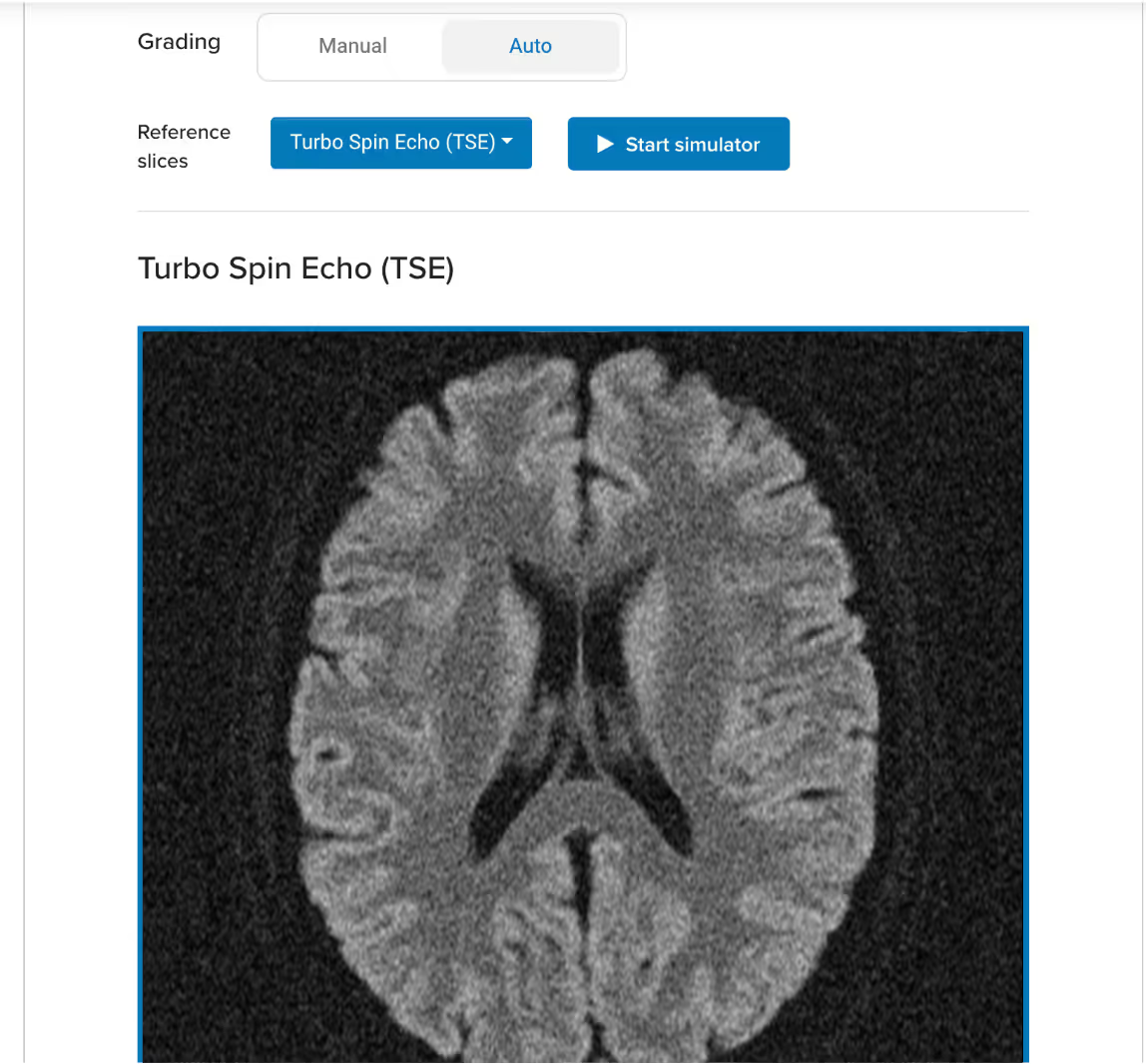
Example of a reference image on an auto-graded scan exercise:

Corsmed UI: a scan assignment block that uses auto-grading, teacher has uploaded an axial T2 TSE of a brain as reference image

Example of an auto-graded scan:

Screenshot of Corsmed's automated grading panel for a knee MRI exercise, showing a student's slice planning scored at 9 out of 16 points with instant feedback on orientation, volume coverage, and centering.

When using auto-grading, you can also specify how the platform should assess students' scans:

  1. What should be assessed:Parameters, slice planning, or both
  2. How strict or lenient the grading should be:The more lenient, the more a student's image can deviate from the reference while still earning a full score.

Corsmed's auto-grading functionality:

Screenshot of Corsmed's auto-grading functionality, showing two button groups. The first button group lets you choose what should be assessed (parameters, slice planning or both), and the second button group lets you choose how strict or lenient the grading should be (Low, Normal or High).

With manual grading, you review each submission yourself and write feedback directly on it, noting exactly what the student got right and what to correct. Students see your annotations alongside their scan.

How does user and cohort management work?

You group students into cohorts and assign each cohort its own programs. Different classes, intakes, or departments can have access to different courses without any overlap.

You can also set time-bounded access, controlling when a course unlocks and when it expires. If a student joins late or needs extended access, you adjust that individually without affecting the rest of the group.

Individual access can be customized down to a single user when needed.

We already use Canvas / Moodle / Blackboard / Brightspace.
Does Corsmed integrate with those?

Yes. Corsmed integrates directly with Canvas, Moodle, Blackboard, and Brightspace. Students access the simulator and scan assignments without leaving your existing platform.

If you prefer to run everything through Corsmed's own LMS, you can do that too. Either way, there's no disruption to your current setup.

How long does setup and onboarding take?

Most programs are up and running within a week. Corsmed is cloud-based, so there's no hardware to install and no IT configuration required. Users access everything through a web browser.

We provide onboarding sessions to help you structure your training program, drawing on what's worked at other hospitals and colleges. You're not building from scratch.

NHS UCLH found that a 1-hour introduction is enough for radiographers to begin practicing independently after that.

Is it difficult to set up and integrate into our training program?

No, setup is extremely simple. Corsmed works on any computer with an internet connection. There's no software to install, no special hardware to buy, and no IT configuration required. Users just log in and access it through a web browser.

NHS UCLH found that a 1-hour introduction is enough for radiographers to begin practicing independently.

"It's straightforward: press 'Scan' and it scans. Click 'Add protocol' and it adds a protocol.

A 1-hour introduction enables our learners to explore independently. There are good video guides within the 'Help' page too."

Noyal Mathew

Noyal Mathew

MRI Practice Educator, NHS UCLH

Even non-technical users learn to use Corsmed very quickly.

"One of our students wasn't very tech-savvy. She needed IT support just to upload her coursework. But she mastered Corsmed, which shows how user-friendly the simulator is."

Dr. Mahmud Khokhar

Dr. Mahmud Khokhar

MRI Program Director, CNI College

How do other organizations use Corsmed? What are common use cases?

Most organizations integrate Corsmed deeply in their training and curriculum.

Here are some ways that leading institutions use our platform:

1. Show how parameters affect images when teaching

“ "When teaching MRI physics, I don’t have to rely on imaginary scenarios. I can show students the exact result when they apply physics concepts in practice. This visualization is the main part that helps me teach physics."

Zohreh Taghizadeh

Zohreh Taghizadeh

MRI Program Specialist, CNI College

2. Give students unlimited hands-on practice
(and meet certification requirements)

"Using the simulator, our students complete 500 scan cases across a wide range of anatomies and pathologies. ARMRIT allows students to count two simulation cases as one hour of externship, up to 250 hours."

Dr. Mahmud Khokhar

Dr. Mahmud Khokhar

AoS MRI Program Director, CNI College

3. Practice on rare anatmoies and pathologies

"Students use Corsmed for advanced scans before clinical. This creates amazing opportunities to learn cardiac, contrast, and pathologies through advanced scans they won't see much, even after a 15-week clinical placement."

Ayman Darwish

Ayman Darwish

MRI Instructor, NAIT

4. Design courses with hands-on scanning exercises, blending theory and practice

"Corsmed's feature for building course modules with simulator scanning exercises is extremely helpful. It's a really good function to combine theory and hands-on practice."

Samantha Mataka

Samantha Mataka

MRI Lecturer, University of Cumbria

5. Assess learners and track competency

"Corsmed's simulator is an excellent assessment tool because students build protocols and sequences from scratch. It shows exactly what parameters they've entered and how they've prescribed planes, which helps us test their understanding in many areas."

Ray Lee

Ray Lee

MRI Program Director, BCIT

How do we know if users are actually progressing?

The analytics dashboard gives you a live view of your whole cohort. Module completion, time spent on the simulator, scan count, and grades for every student are visible at a glance.

You can drill into any individual to see exactly where they are in the curriculum and which exercises they've completed. In a self-paced program, this lets you catch who is falling behind before it becomes a problem.
What if we run into technical issues or need help?

You get full support. Every account includes direct access to our support team and built-in help resources, including workflow videos and guides.

We also offer onboarding sessions to help you structure your training program around the simulator, based on what has worked for other hospitals and colleges. You are never on your own.