For individuals seeking MRI practice

Build your confidence in MRI scanning with the Corsmed MRI simulator

You know the theory, but you need practice. Our MRI simulator gives you unlimited hands-on scanning to build real confidence – without a physical scanner.

Corsmed interfaces showing the MRI simulator, a list of Training Courses, a certificate of course completion, and Feedback on a scan result.

You know the theory, but you need practice. Our MRI simulator gives you unlimited hands-on scanning to build real confidence – without a physical scanner.

Corsmed interfaces showing the MRI simulator, a list of Training Courses, a certificate of course completion, and Feedback on a scan result.

Getting practical experience in MRI scanning is not easy…

"I've read textbooks and know MRI in theory. But I've barely touched a real MRI scanner.

I need more hands-on practice to actually feel confident before I start my job. But I have no way to get the practice."

– MRI student

"I'm transitioning to MRI from another field and have zero MRI experience.

I need to practice how parameters affect the image so I can scan confidently. I can't afford to look lost on day one."

– Career-changer with no MRI experience

"I've been doing MRI for years, but my facility only does routine neuro and MSK.

I need a way to practice cardiac, MRCP, implants, and other specialized procedures I don't have access to."

– Experienced MRI radiographer seeking specialization
…But it doesn't have to be that way

The Corsmed MRI simulator

Corsmed is a digital MRI simulator that works exactly like a real scanner. It runs in your web browser on any laptop, giving you 24/7 access to practice MRI scanning from anywhere.

It gives you what real scanners can't: unlimited hands-on training.

A laptop displaying Corsmed's MRI simulator interface. The screen shows three images of the brain, in axial, sagittal, and coronal planes, with pulse sequence settings being adjusted in the bottom panel.
Radiographer practicing MRI scanning on laptop using Corsmed's MRI simulator. Planning a lumbar spin protocol.

Add a pulse sequence

1
Radiographer practicing MRI scanning on laptop using Corsmed's MRI simulator. Planning a lumbar spin protocol.

Plan your slices and parameters

2
Radiographer practicing MRI scanning on laptop using Corsmed's MRI simulator. Planning a lumbar spin protocol.

Press "Run" and see your image in 10–180 secs

3

Trusted by leading MRI institutions

The complete bundle to build your MRI confidence

When you purchase Corsmed, you get three learning resources in one bundle. The simulator, a 500-page MRI ebook, and 7 self-study courses – all working together to take you from theory to clinical competence.

A laptop displaying Corsmed's MRI simulator interface. The screen shows three cross-sectional knee scan images with pulse sequence settings being adjusted in the bottom panel.

MRI Simulator

Your personal MRI scanner accessible 24/7 from any laptop. Practice unlimited scans without time limits or patient constraints.

Right pointing arrow
$185 value
Book: "Boyd's Comprehensive Guide to MRI", by Doug Boyd

500-page MRI eBook

Boyd's Comprehensive Guide to MRI is the authoritative guide used by MRI programs worldwide. Covers all types of protocols, including brain, spine, MSK, body, and cardiac.

Corsmed's 7 self-study MRI courses: 1. Pulse Sequences, 2. Parameters and Their Affect on Image Quality, 3. Neuro Brain, 4. Neuro Spine, 5. MSK,  6. Body,  7. Cardiac

7 self-study Courses

Self-paced courses from beginner to advanced. Cover parameters, pulse sequences, and a wide range of clinical applications. 65 modules in total (~65 hours).

Get started today

6-month access
Best for short-term skill building
$175/month
Get started
What's included in every bundle:
✓ MRI Simulator with unlimited scanning access
✓ Boyd's Comprehensive Guide to MRI (500-page digital textbook)
✓ 7 Self-Study Courses
✓ Certificates of Completion for every course
✓ Access to all anatomies, pathologies, and advanced cases
✓ Practice cardiac, neuro, MSK, body imaging, and more

See the MRI simulator demo

Explore the MRI simulator
Back arrow icon

How Corsmed builds your scanning confidence

Practice unlimited MRI scans on your laptop, no scanner needed

1

Practice without restrictions – 24/7 access

Access Corsmed from any laptop, anytime. Scan as much you want – there are no restrictions on how many scans you can run. Repeat that challenging protocol until you've mastered it.

What I love most about Corsmed is the freedom. I can hop on from any laptop whenever I want, and practice without worrying about limits.

If a protocol feels tough, I just run it again until I can do it perfectly.
Michael Bishop – MRI Student at CNI College
Michael Bishop
MRI Student, CNI College
MRI technologist / radiographer using Corsmed's MRI simulator on a laptop in a cafe
2

See parameter effects in real-time

Corsmed makes parameter effects immediately visible.

Reading about TR, TE, and flip angles is one thing. Actually seeing how they affect your image helps you learn to apply the theory in practice.

“When you read textbooks, it’s just maths. You can't see how changing TE, TR or bandwidth will affect the final image.

Corsmed helped me visualize how the concepts work together so I could apply them in practice."

Kayla Nguyen – MRI Student at British Columbia Institute of Technology
Kayla Nguyen
MRI Student, British Columbia Institute of Technology

Work in the same way as on real scanners

3

Corsmed uses a single vendor-neutral interface that mirrors the standard workflows shared by all MRI scanner manufacturers (GE, Siemens, Philips, etc). The skills you learn on Corsmed transfer directly to real-world scanning.

"As an MRI educator, I appreciate Corsmed’s vendor-neutral design.

Learners stop focusing on button labels and start grasping the core MRI concepts. That shift has made them far more skilled on every scanner they touch."

Noyal Mathew – MRI Practice Educator at NHS University College London Hospitals
Noyal Mathew
MRI Practice Educator, University College of London Hospitals NHS Trust
Top image shows a real radiographer operating an MRI scanner while a patient lies inside the bore, with planning images displayed on a clinical console. Bottom image shows a radiographer practicing MRI scanning on the Corsmed MRI simulator using a laptop at home, with simulated planning images visible on the screen.

Make mistakes freely in a safe environment

4

Corsmed gives you psychological safety. Try different parameters, make planning errors, and see what happens when you combine wrong settings – without worrying about patient safety.

“In clinics, you can't play with parameters because you're working with real patients.

But on Corsmed, I can experiment freely. I can go: ‘What if I try this?’ or ‘What if I do that?’ without feeling pressured.”

Beth Kempton – MRI student at University of Cumbria
Beth Kempton
MRI Student, University of Cumbria
Top image shows a user adjusting scan parameters in the Corsmed MRI simulator. The user selects Turbo Spin Echo, sets TR to 4000 ms, refocusing flip angle to 180 degrees, bandwidth to 781.3 Hz, and lowers NEX/NSA to 1. A blue thought bubble says “What if I lower NEX/NSA?”.
Bottom image shows the resulting elbow MRI, now very grainy, with heavy noise due to the reduced averages. Another blue thought bubble says “Oops, too much noise!”.
5

Access rare cases on-demand

Want to practice cardiac MRI, implant scanning, or MRCP but your facility doesn't offer it? On Corsmed, you can practice any examination, any anatomy, any pathology – whenever you want.

"At my site, you just see the same routine brain and spine scans with no variety.

But with Corsmed, you can see long bones, abdomen, cardiac – scans that aren't super common in many clinical settings."

Justin Jorquez – MRI student at CNI College
Justin Jorquez
Board Certified MRI Radiographer, Excel Imaging Center
Three screenshots of the Corsmed MRI simulator interface showing slice planning for three different anatomies. The first screen displays cardiac imaging with T1 mapping. The second screen shows ankle imaging with a metal implant. The third screen displays shoulder imaging using the clock face method.

Structured training from beginner to expert

Seven comprehensive courses that systematically build your MRI scanning skills and confidence

Course 1
4 modules

Pulse Sequences and Their Applications

Master the fundamental pulse sequences used in MRI. Learn spin echo, gradient echo, EPI, and special sequences. Understand how each functions, when to apply them, and their role in clinical settings.
Course 2
6 modules

Parameters and Their Impact on Image Quality

Learn the key MRI parameters for optimal image quality. Understand relationships between acquisition time, resolution, and SNR. Understand how to adjust parameters to balance signal, resolution, and scan efficiency.
Course 3
19 modules

Clinical Applications – Neuro Brain

Complete neuroimaging protocols for brain examinations. Learn standard and specialized sequences for various neurological conditions including routine brain, pituitary, orbital, stroke, MS, MRA, MRV, DTI, and perfusion.
Course 4
6 modules

Clinical Applications – Neuro Spine

Practice spine imaging protocols across all spinal regions. Master techniques for C-spine, T-spine, L-spine, sacrum, coccyx, brachial plexus, and specialized applications including soft tissue neck.
Course 5
16 modules

Clinical Applications – Musculoskeletal

Complete MSK imaging protocols for all major joints and extremities. Learn optimal positioning, sequence selection, and pathology-specific protocols for knee, shoulder, wrist, ankle, hip, and more.
Course 6
12 modules

Clinical Applications – Body

Comprehensive body imaging protocols for abdominal and pelvic examinations. Master techniques for liver, pancreas, kidney, MRCP, MR enterography, prostate, uterine, ovarian, rectal, and soft tissue imaging.
Course 7
2 modules

Clinical Applications – Chest and Cardiac

Specialized protocols for cardiac and breast imaging. Learn advanced techniques for cardiac function assessment, perfusion studies, and comprehensive breast pathology evaluation.

How You'll Learn

The first 2 courses are video courses shown directly on the simulator, where you learn by doing. The remaining 5 courses are textbook-based modules from Boyd's Comprehensive Guide, giving you the theoretical foundation that supports your hands-on practice.

Additional programs included in your subscription

Your subscription doesn't just give you access to the Bundle Training Program.

You'll also have access to many additional premium programs built by professional MRI specialists, including:

  1. MRI Safety
  2. Cross sectional anatomy
  3. MRI fundamentals
  4. Artifact mangements
  5. Image optimization
  6. Clinical applications
  7. Cardiac MRI

…And many more!

Screenshot of Corsmed's pre-built program catalog, showing 12 ready-made MRI courses ranging from beginner topics like MRI Fundamentals and Safety in MRI to advanced programs covering Cardiac MRI, Artifacts Management, and Clinical Applications.

Prove your skills with certificate of completion

Upon completing the training program, you'll receive a certificate that validates your learning.

Your certificate will include a comprehensive overview of courses taken and skills acquired, consolidated into a single document.

This digital credential serves as a valuable asset for showcasing your qualifications and progress, making it easy to share your accomplishments with peers, educational institutions, and employers.

Think of it as your MRI training resume: concrete proof of the work you've put in and the competence you've built.
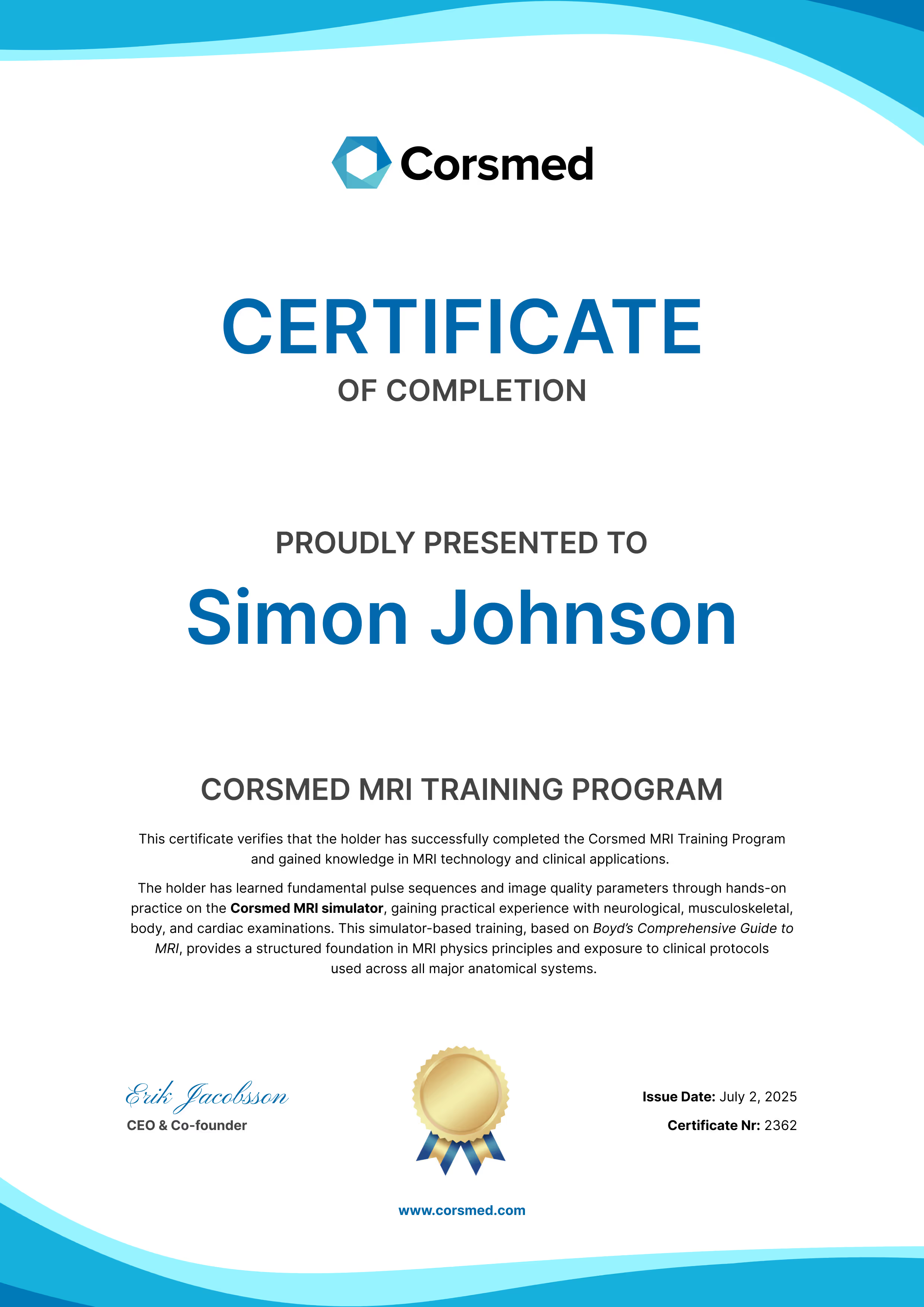
Corsmed MRI Bundle – Certificate of Completion

Get a digital MRI scanning resume

All your usage stats, progress, and achievements on one page – easily shareable to prove your competence to employers.
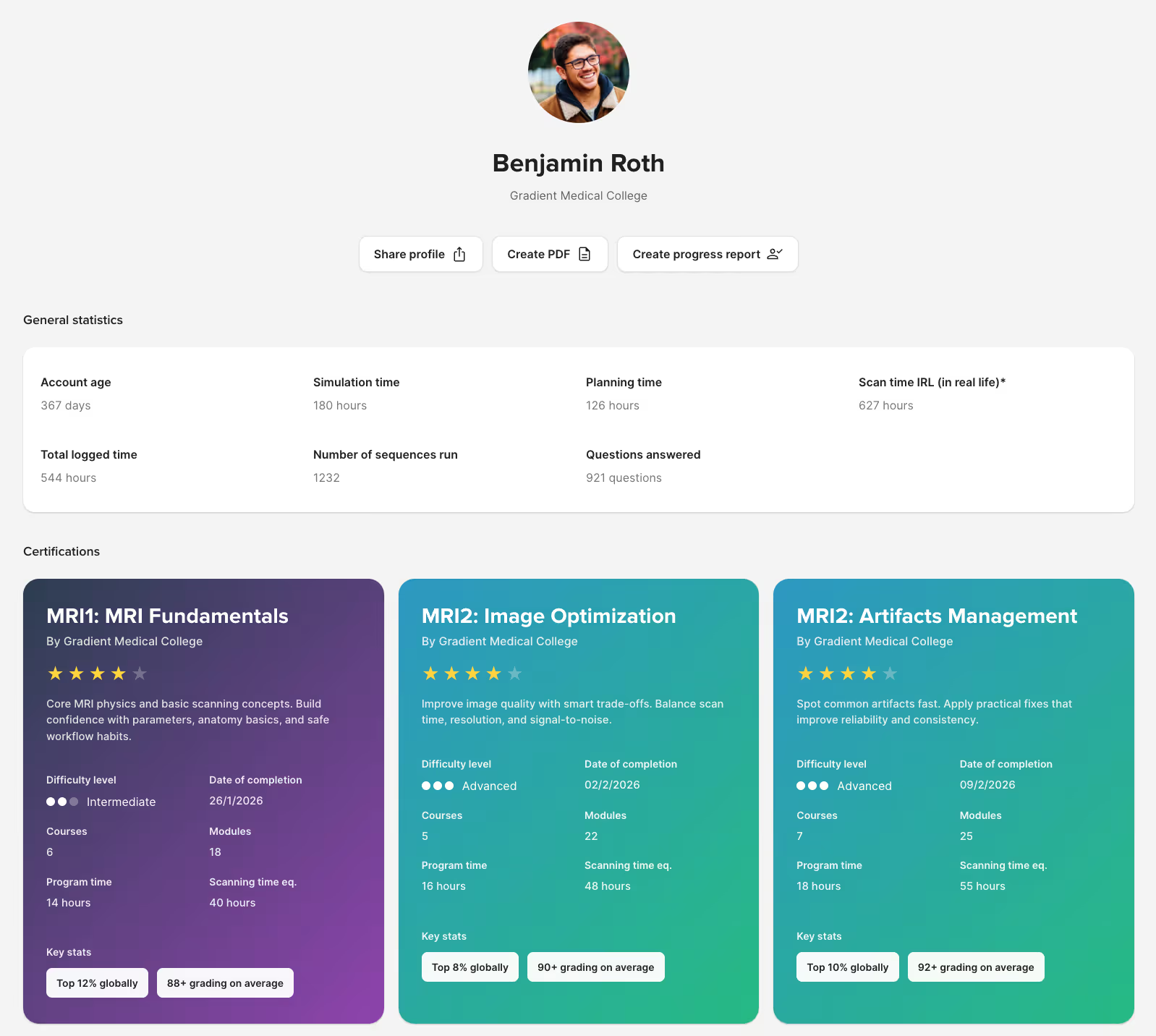
Corsmed student digital resume displaying MRI course certifications and performance stats like simulation hours, planning time, and sequences completed.

What our users say

Real feedback from radiographers and students who have built their confidence with Corsmed

"Before clinicals, I was nervous. But Corsmed gave me a better idea of what to expect.
The simulator really helped me understand the trade-offs between SNR, resolution and scan time. Now, I know how to adjust the parameters to create good images in any situation.
Kayla Nguyen – MRI Student at British Columbia Institute of Technology
Kayla Nguyen
MRI Student
"I did not feel prepared for the clinical setting with only theoretical knowledge.
Corsmed helped me understand how changing parameters affected SNR, resolution, and scan time. It helped me bridge that gap between theory and practice."
Profile Icon
Julie P.
MRI Radiographer
"When I was only reading textbooks it was very nerve-wracking. How am I going to apply this?
But once I got to use Corsmed, it was like a beacon of light! I could play with parameters and see how the body appears on the console. It was very helpful preparation for my real clinical practice."
Michael Bishop – MRI Student at CNI College
Michael Bishop
MRI Student
"Soon after I started my university MRI program, I was unsure if I would make it. The physics were so hard!
But when I could play with concepts on the simulator and see the resulting image, it finally clicked! Corsmed played a big role in helping me push through. I now feel well-prepared to start my career."
Beth Kempton – MRI student at University of Cumbria
Beth Kempton
MRI Student
"When you study MRI through textbooks, you can only get so much from it.
Practicing on Corsmed gave me something to visualize. It really helped me understand how to plan slices, place saturation bands, and adjust the parameters to get a good image every time.
Justin Jorquez – MRI student at CNI College
Justin Jorquez
Board Certified MRI Radiographer
"I had never seen a shoulder scan, and I felt nervous about my clinical externship.
But I saw a lot of shoulder scans on Corsmed. When I went to my externship, I was already familiar with how it looks. Corsmed helped me feel confident before starting."
Clark Barretto – MRI Student at CNI College
Clark Barretto
MRI Student

Get started today

6-month access
Best for short-term skill building
$175/month
Get started

Frequently asked questions

Can I use this with no prior MRI experience?

Yes. Many users start with zero MRI experience: students before clinicals, radiographers transitioning from CT/X-ray, or career changers entering the field.

Our MRI Training Bundle includes foundational courses that build your knowledge from the ground up.

Will this actually help me feel more confident scanning?

Yes. That's the entire purpose of Corsmed – to give you the hands-on practice you can't get elsewhere. You'll repeat scans until you understand them, experiment with parameters safely, and practice procedures you've never seen clinically.

The confidence comes from repetition without risk. As one user put it:

"Before clinicals, I was nervous. But Corsmed gave me a better idea of what to expect.

The simulator really helped me understand the trade-offs between SNR, resolution and scan time. Now, I know how to adjust the parameters to create good images in any situation."

Does it actually simulate a real MRI scanner accurately?

Yes, and we're the only simulator that does. Most simulators use image libraries: you change a parameter, the image stays the same. Corsmed generates images the same way real scanners do, so every parameter change produces the correct visual effect.

That means students learn real cause-and-effect relationships, not button sequences. What they practice on Corsmed is what they'll see in a real clinic.

How long does it take to complete the training?

Around 65 hours. The 7 courses contain approximately 65 modules, each taking about 1 hour to complete, for a total of roughly 65 hours. However, you can progress at your own speed, spending more time on challenging concepts or moving quickly through familiar material.

Your simulator and course access remain for the full duration of your subscription. Even after you complete the program, you can still practice as much as you want on the simulator, go through the courses again, and repeat the exercises.

Is there live teaching or is it self-study?
It's self-paced learning. There are no live classes or fixed schedules. You work through the courses and practice on the simulator whenever it suits you, at your own pace, on your own schedule.
How do I know if I'm doing it correctly?

The simulator shows you immediately if your scan works. You see the resulting image quality, contrast, resolution, SAR levels, and scan time as soon as you run the sequence.

What counts as "correct" scan depends on the clinical situation: a T1-weighted brain scan requires different settings than a cardiac cine.

To know if you're scanning correctly, we provide scanning exercises with instant auto-graded feedback. Our course material includes many scan exercises where you're tasked to perform specific types of scans. The auto-grading gives you clear feedback on whether you've achieved the clinical objective, and if not, how you can improve your scan.
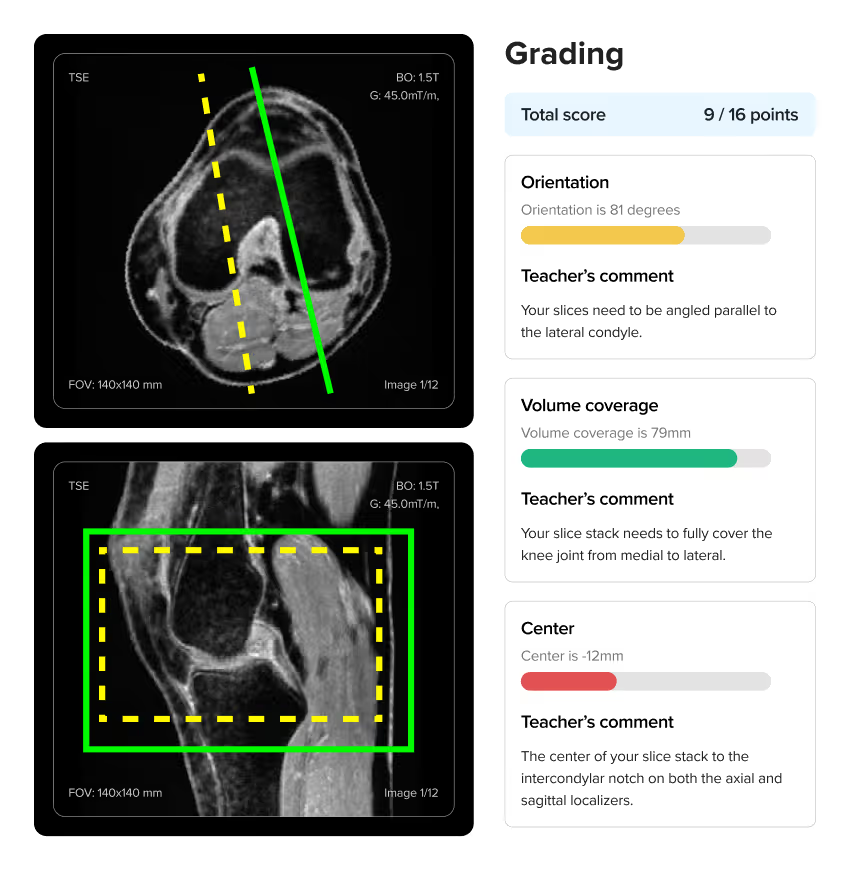
For individuals, our MRI bundle includes Doug Boyd's textbook Boyd's Comprehensive Guide to MRI, which also contains reference images showing what correct scans should look like for different protocols.

For organizations, we provide pre-built courses you can deploy immediately. You can also build custom courses and create your own scan assignments tailored to your curriculum. You can create your own scan exercises, or use those the Corsmed team has built.

Does it simulate specific scanner brands (GE, Siemens, Philips)?

Corsmed offers a single vendor-neutral interface. This helps you focus on learning the universal MRI principles that apply across all manufacturers, rather than where button happen to be located on a specific brand.

Mastery of the fundamentals is what employers most look for when hiring:

"As an MRI educator, I appreciate Corsmed’s vendor-neutral design.

Learners stop focusing on button labels and start grasping the core MRI concepts. That shift has made them far more skilled on every scanner they touch."

Noyal Mathew – MRI Practice Educator at NHS University College London Hospitals
Noyal Mathew
MRI Practice Educator, University College of London Hospitals NHS Trust
Does this give me official MRI certification?

No. Corsmed provides training and certificates of completion, but not official registry certification from regulatory bodies like ARRT, ARMRIT, HCPC, or CAMRT.

However, for U.S. and Canada users, ARMRIT allows you to complete 250 of your required 1,000 clinical hours on Corsmed's simulator.

Can I practice on different body parts and pulse sequences?

Yes. The simulator includes a wide range of anatomical models and lets you practice different pulse sequences, orientations, and protocols, just as you would rotate through different exam types in a clinical setting.

You can see a full list of all anatomies, sequences and settings that are available on the Corsmed MRI simulator here: Corsmed MRI Simulator – The complete list of settings

Can I perform cardiac MRI scans?

Yes. The simulator fully supports chest and cardiac MRI, including:

  1. Cine imaging
  2. Myocardial infarction (MI) pathology
  3. ECG-gating
  4. Control over the patient's heart rate and cardiac phase
  5. Playback of the cardiac phase and visualize the heart beating

When you subscribe to the simulator, you also get free access to our Cardiovascular Magnetic Resonance program. This program consists of our four courses that dive into cardiac MRI:

  1. Foundations of CMR (4 learning modules)
  2. Cardiac Morphology and Global Function (5 learning modules)
  3. Tissue Characterisation (4 learning modules)
  4. Blood Flow and Phase Contrast (2 learning modules)

Our MRI Bundle also includes a full cardiac & chest clinical applications course. This is one of the most requested specializations and is included at no extra cost in the bundle.

Can I practice contrast injections?

Yes. The simulator includes dynamic scanning and bolus injection tools. You can perform simulated scans with contrast injections, adjust the amount and timing of the contrast, and also the weight of the patient.

We also have a special bolus injection timing tool, where you can practice injection timing without real-life pressure.

How is this different from ScanLabMR?

Corsmed is more accurate and comprehensive. We're built on actual MRI physics equations, not approximations.

When you change inputs on ScanLabMR, you rarely get the same exact image as you'd have gotten on a real scanner.

When you change any input on Corsmed (sequence, parameter, hardware, patient, anatomy, motion, pathology, positioning or slice angling), you get exactly what you'd see on a real scanner. You see all the effects, including contrast, resolution, SNR, scan time, SAR, CNR, and artifacts.

Artifacts, especially, is a critical part of mastering MRI scanning, and something only Corsmed can simulate accurately. Use wrong slice planning or parameters on Corsmed, and you'll see artifacts just like a real scanner would, including:

  1. Motion ghosting
  2. Wrap (aliasing)
  3. Gibbs
  4. Chemical shift
  5. Noise
  6. Turbo blurring
  7. Partial volume
  8. Susceptibility
  9. Geometric distortion
  10. Nyquist ghosting
  11. Blooming artifact on T2*
  12. Magic angle
  13. Respiratory
  14. Cross-talk

...And many more.

With Corsmed, you can trust that you learn real scanning skills.
What you see on the simulator is what you'll see in a real clinic with a real scanner.

Many organizations have switched from ScanLabMR to Corsmed for this reason, including Forsyth Technical Community College and Imperial College Healthcare NHS Trust.

What device and internet speed do I need?

Any laptop 7-10 years old or newer works. The simulator runs in your web browser. You don't need to download or install any software.

A rule of thumb: if your computer can visit the web and email, it's enough to run Corsmed. It can be used on a tablet, but it's not practical on mobile, as the simulator interface requires a larger screen size.

You'll need 1 Mbit/s internet speed (down/up).

Do I need to stay subscribed for the entire period?

Yes. Both the 6-month and 12-month subscriptions will remain ongoing for the entire duration you purchased.

But there are no usage limits. You can perform as no limit to how many scans you want, and you will have full access to all learning materials for the full duration of your subscription.

Is there a free trial?

Yes. You can sign up and try the MRI simulator for free here:

Try for free
What if I run into technical issues or need help?

You get full support. Every account includes access to our support team, built-in help resources, workflow videos, and guides. You will not have to figure things out on your own.