How to plan an ankle MRI protocol with metal implant
Written by:
Erik Jacobsson
This step-by-step guide is for MRI students, radiographers, and technologists who wish to improve their planning skills and master the ankle MRI protocol with metal implants.
What you will learn:
Key factors in ankle MRIs with metal implants, including trade-offs.
Patient and scanner setup tips.
Best pulse sequences and planning techniques.
Ways to avoid common artifacts.
What great images of ankles with metal implants should look like.
Key Takeaways
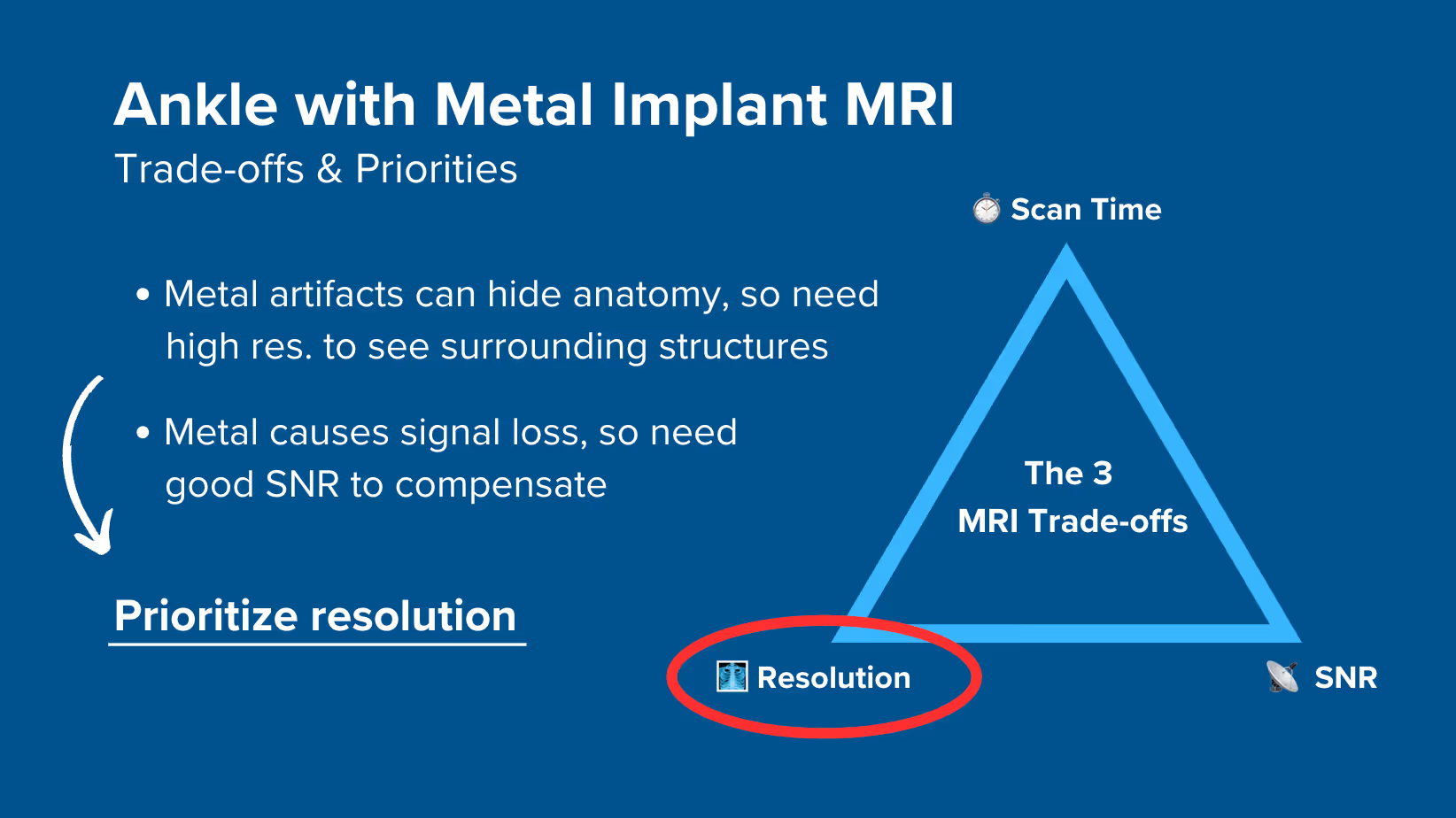
Because metal implants create artifacts that hide anatomy, it's recommended to prioritize resolution.
Metal artifacts can obscure important structures around the implant. We need high resolution to see tissues clearly and strong SNR to overcome signal loss from the metal.
Therefore, we typically 1) prioritize resolution, 2) maintain strong SNR, and 3) optimize scan time as needed.
For ankle MRIs with implants, we mainly use Turbo Spin Echo with STIR fat suppression.
Turbo Spin Echo (TSE) handles metal artifacts far better than gradient echo sequences. STIR fat suppression also works better than spectral suppression around metal, because it doesn't rely on a uniform magnetic field.
This combination of TSE + STIR helps us see tissues around implants clearly to check for infection, loosening, or healing problems.
Avoid these 5 common ankle artifacts when imaging with metal implants.
Artifacts
Solution – How to Avoid It
Metal artifacts
Increase bandwidth, use high resolution, and enable parallel imaging.
Chemical shift artifacts
Increase the bandwidth above 220 Hz per pixel.
Wrap-around artifacts
Set appropriate phase direction and use foldover suppression.
Motion artifacts
Shorten scan time to reduce motion blur.
Flow artifacts
Use flow compensation or adjust phase encoding direction.
Intro to Ankle MRIs with Metal Implants
The ankle is a complex joint that handles a lot of pressure. It supports our full body weight daily through walking, running, and jumping.
Due to high stress and frequent injuries, many patients receive metal implants for fracture fixation, joint replacement, or ligament reconstruction.
When imaging ankles with metal implants, however, we face unique challenges. Metal disrupts the magnetic field and creates artifacts that can hide important anatomy.
Implant of a total ankle replacement, seen from lateral (side view) and anteroposterior (front view). X-ray images. Image credit: Hospital for Special Surgery
We must therefore use special techniques to handle these metal artifacts.
MRI and Implants: Why Metals Need Special Attention
Most orthopedic implants are made from one of three materials:
Polymers
Ceramics
Metals
Polymers and ceramics are always MRI-safe. These include plastic spacers, PEEK cages, and ceramic heads. They do not interact with magnetic fields, do not conduct current, and cause no imaging distortion.
Metals are different. While they may be weakly or non-magnetic, they can still disrupt image quality. This is why most metal implants are labeled "MR Conditional". They are safe to scan under specific conditions, but they may cause artifacts.
Before scanning, always:
Ask the patient if they have any implants.
Request implant documentation when available.
Check implant safety on resources like MRIsafety.com.
Once confirmed as MR Conditional, the focus shifts to managing image quality and safety.
MRI and Metals: What You Must Know
Even if a metal is MR Conditions and won’t move in the scanner, it can still cause artifacts.
How great the artifact is depends on how magnetic the metal is. Some metals, like stainless steel and cobalt-chromium, cause significant artifacts that distort or hide anatomy.
Other metals, like titanium and tantalum, have minimal impact.
Metal Type
Common Uses
Magnetic Behavior
Artifact Severity
Titanium, titanium alloys
Screws, plates, joint implants
Non-magnetic
Minimal
Tantalum, platinum
Surgical clips, electrodes
Non-magnetic
Minimal
Stainless steel
Rods, pins, fixation hardware
Weakly magnetic
Strong
Cobalt–chromium
Joint replacements, prostheses
Weakly magnetic
Strong
Iron alloys
Rare legacy implants
Magnetic
Very strong
Large implants such as hip prostheses or spinal rods may also heat surrounding tissue. This happens when radiofrequency pulses induce electrical currents in the metal.
To reduce heating risk:
Avoid sequences with high Specific Absorption Rate (SAR).
Limit scan duration where possible.
Monitor the patient closely during the exam.
MARS vs SMART: The 2 Approaches to Metal Implant Imaging
Once an implant is cleared for scanning, the next step is choosing how to reduce artifacts. There are two main approaches:
MARS – Metal Artifact Reduction Sequences
MARS uses prebuilt sequences developed by scanner vendors. These are based on turbo spin echo with techniques like View Angle Tilting (VAT).
Each vendor has their own version of MARS:
Siemens: WARP
GE: MAVRIC
Philips: O-MAR
The benefit of MARS is that they are pre-configured and are ready to scan. You simply select the preset and adjust a few parameters.
However, each version of MARS is vendor-specific and are not available on other scanners.
SMART – Standard Metal Artifact Reduction Techniques
SMART uses regular turbo spin echo sequences that are available on any scanner. You then manually parameters to reduce metal artifacts, such as:
Increasing spatial resolution
Raising bandwidth above 220 Hz/pixel
Enabling GRAPPA or other parallel imaging
SMART therefore takes more work to set up. However, you can use the same SMART sequences on any scanner, regardless of brand.
This approach provides full control and consistent results across systems.
The 3 Key Parameters to Handle Metal Artifacts
To handle metal artifacts with the SMART approach, there are three key parameters we adjust.
Bandwidth: At 1.5T, water and fat are 220 Hz apart. When we set bandwidth above this, we prevent fat from shifting away from water in the image. Higher bandwidth also shortens echo spacing, which reduces how much the metal can distort our image.
NEX/NSA/Averages: High bandwidth reduces SNR, so we must add more signal averages to get that signal strength back. This keeps our images clear while controlling metal artifacts.
Parallel Imaging (GRAPPA): Parallel imaging techniques, like GRAPPA, lets us speed up the scan by using coil data to reconstruct missing signals. This helps keep scan times short while still managing artifacts effectively.
How to Balance the 3 Trade-offs in Ankle MRIs with Metal Implants
In MRI, we always face a trade-off between 3 key metrics:
Scan Time: How fast a pulse sequence can be completed.
Resolution: How much detail the image can display.
SNR: How clear the image is, how much signal relative to noise.
Improving one of these metrics reduces the performance of the others. To decide what trade-offs to make, we must consider the needs of each clinical situation.
For ankle MRIs with metal implants:
Metal artifacts can hide important anatomy around the implant, so high resolution is a must to see surrounding structures despite the distortion.
Metal also causes signal loss, so we need strong signal to compensate for this.
Therefore, we typically 1) prioritize resolution, 2) maintain strong SNR for clarity, and 3) optimize scan time as needed.
Note! Prioritizing resolution in ankle MRIs with metal implants is only a general guideline, NOT a strict rule. If your patient can't stay still for longer scans, you may need to reduce resolution slightly. The right balance always depends on the needs of your patient and clinic.
Ankle Health Conditions and the MRI Sequences That Reveal Them
The ankle MRI with metal implants can help diagnose various complications and conditions. The table below lists the most common conditions and the pulse sequences that reveal them:
Provides clear contrast between bone and soft tissues. T1 shows bone marrow changes and helps assess implant-bone interface. Fat appears bright, making making bone problems appear dark and easy to spot.
Suppresses fat signal completely, making water-rich tissues stand out. Ideal for detecting subtle inflammation, infection, or edema that might be obscured by fat signal.
How to Perform an Ankle MRI with Metal Implant
The step-by-step guide below will show you how to set up and perform an ankle MRI protocol with metal implants in practice.
We will perform the protocol in 3 parts:
Set up the Patient and MRI Scanner
Plan and Acquire the Protocol Sequences
Review the Images
Part 1: Set up the Patient and MRI Scanner
1. Verify Implant Safety
Before scanning, always verify the implant is MR Conditional.
Check MRIsafety.com or request implant documentation to confirm safety parameters.
2. Position the Patient and Coils
Lay the patient feet-first and supine (on their back) with the ankle centered at the scanner's isocenter.
Positioning the patient feet-first increases comfort and reduces motion artifacts, especially in those who may feel anxious in enclosed spaces.
Use a dedicated foot coil array to ensure high-resolution imaging. This coil provides strong signal reception and full coverage of the ankle area.
✅ Correct Patient Positioning:
3. Check the Scanner’s Hardware Settings
Once the patient is in place, review your scanner’s hardware settings.
In this guide, we will use the following settings:
Scanner Setting
Value
Why This Value
Magnetic field strength
1.5 T
Enables high Signal-to-Noise Ratio, which gives superior image quality.
Maximum gradient strength
45 mT/m
Enables faster acquisitions while preserving high image quality.
This hardware setup is widely used in clinical practice. It balances acquisition time, image quality, and patient comfort.
4. Capture the Initial Localizer Images
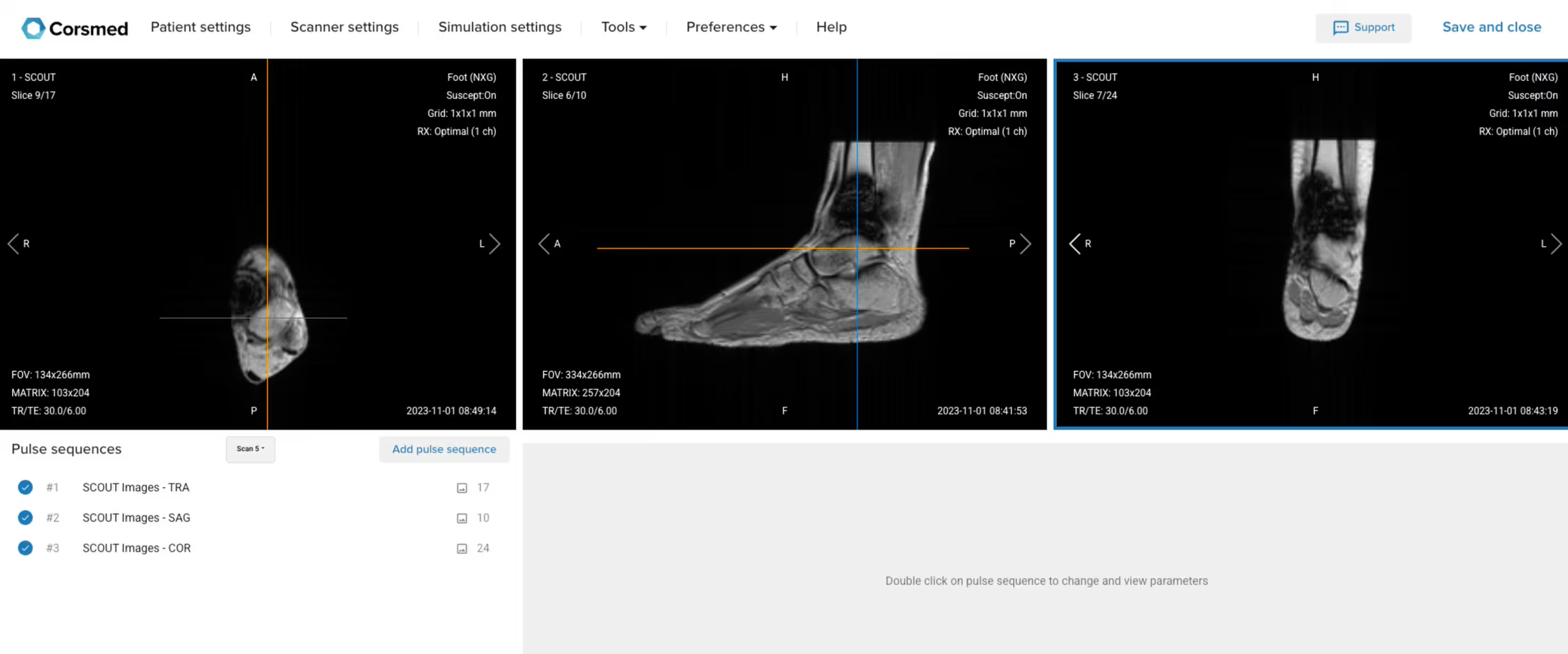
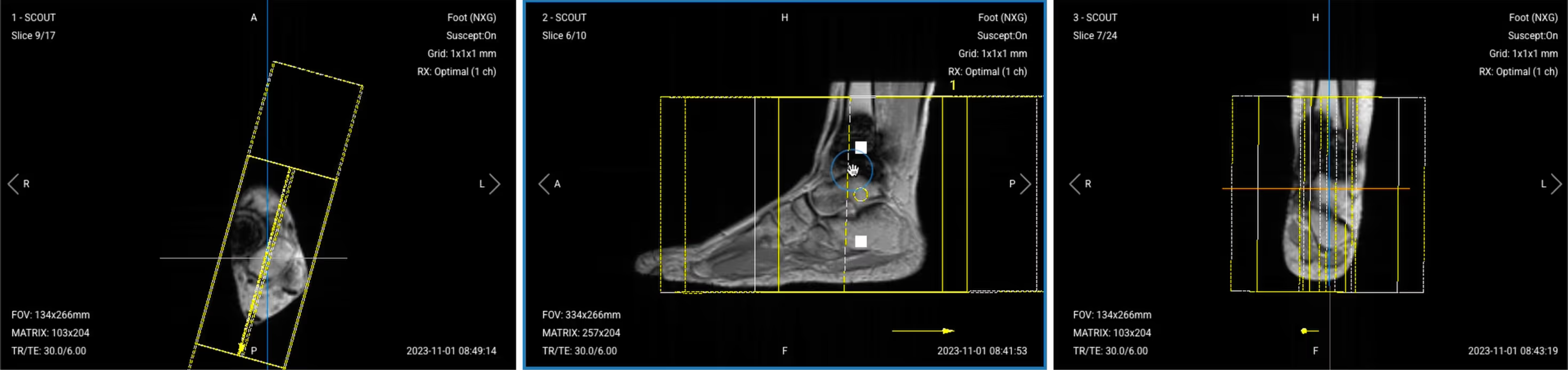
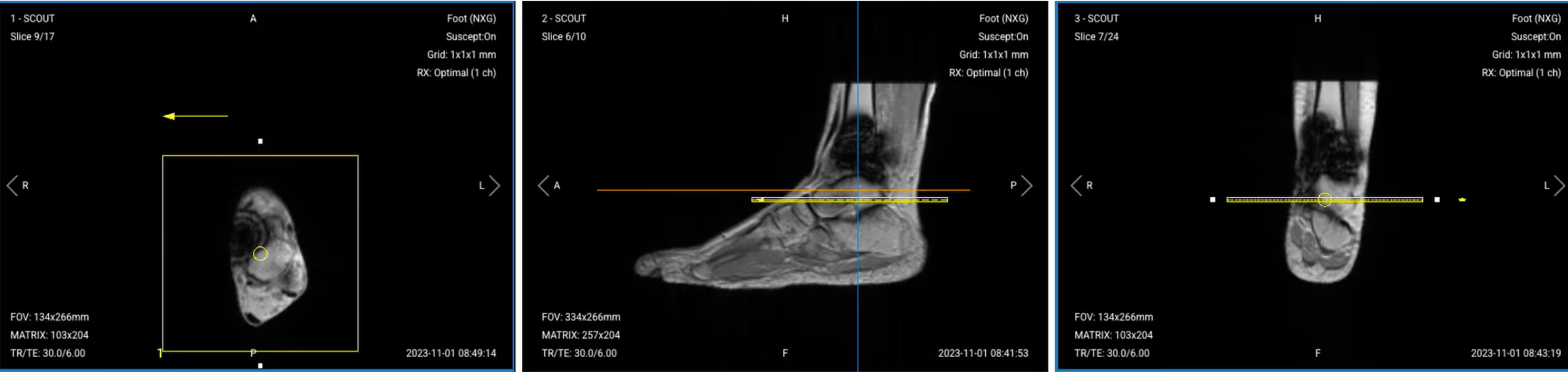
Before we can perform any MRI protocol, we must always capture initial localizer images of the patient. These images act as a guide for planning the detailed scans we will perform next.
We should always capture localizers in three planes:
Axial
Sagittal
Coronal
Once acquired, upload the initial localizer images into the three viewports.
Then, scroll through each of the image stacks to locate a central slice that clearly shows the anatomy of the ankle.
✅ Correct Setup of Localizer Images for Ankle MRI:
Part 2: Plan and Acquire the Protocol Sequences
When all preparations are ready, we can start planning and acquiring the protocol sequences.
Let's go through the pulse sequences a standard ankle MRI protocol with metal implants includes, why we perform them, and how to set them up.
The 5 Sequences of a Standard Ankle Protocol with Metal Implants
Sagittal T1 TSE
Sagittal PD STIR
Coronal PD STIR
Axial PD STIR
Axial T2 TSE
We mainly use Turbo Spin Echo sequences with STIR fat suppression for this study. These sequences handle metal artifacts much better than gradient echo sequences and provide consistent fat suppression even near metal implants.
STIR fat suppression also works better than spectral suppression around metal, because it doesn't rely on a uniform magnetic field.
In the sections below, we go through how to plan and set up each sequence.
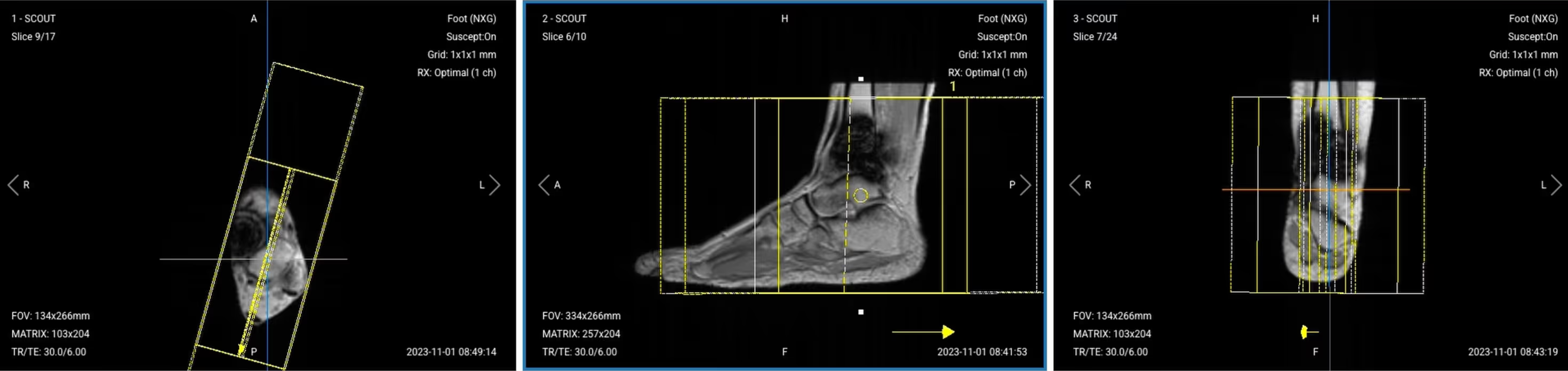
1. Sagittal T1 TSE
✅ Correct Planning:
Planning Instructions:
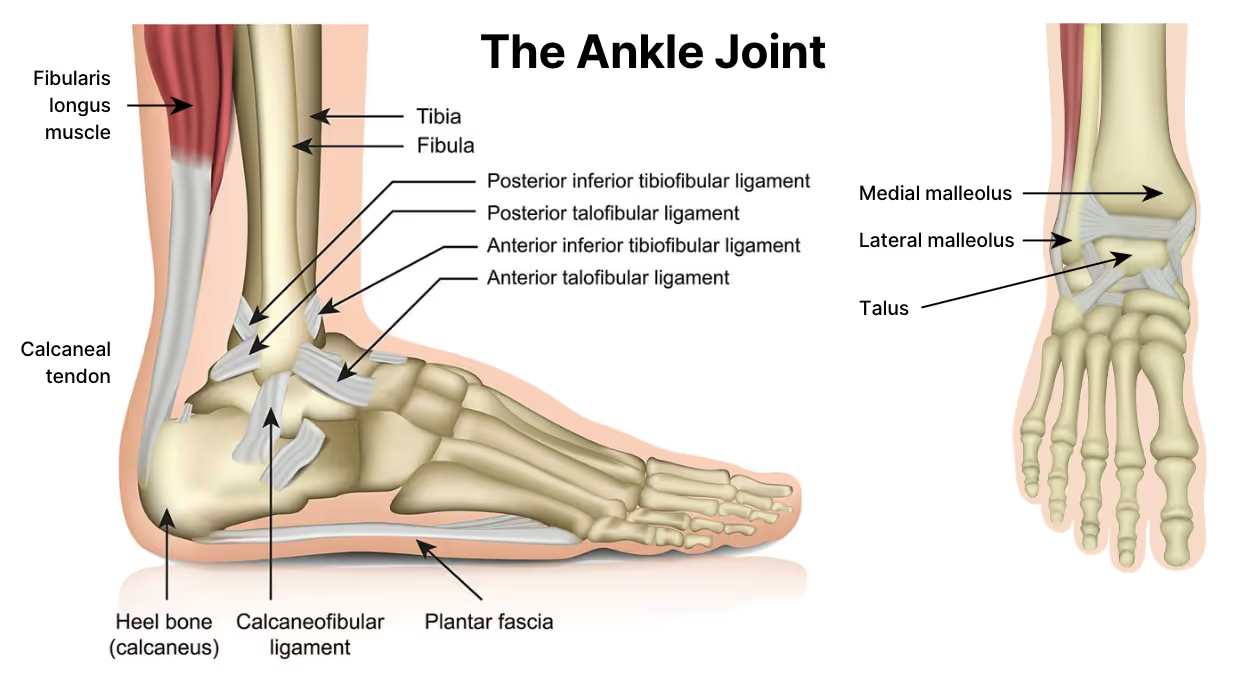
Use the medial and lateral malleoli as your anatomical references.
Align the slices as follows:
Axial localizer: Angle slices perpendicular to the malleoli and center over the ankle joint.
Sagittal localizer: Center the slice package over the ankle.
Coronal localizer: Ensure slices are parallel to the tibial bone.
Use appropriate geometry parameters:
Slice number: Enough slices to cover the ankle from medial to lateral (20–25 slices).
Slice thickness: 3 mm for high resolution to visualize tissues around the metal.
Slice gap: 0.3 mm (10% of slice thickness) to maintain continuity.
Set the fold-over direction (phase encoding) to anterior–posterior (AP) to steer wraparound artifacts away from the implant.
Parameters for Sagittal T1 TSE:
Parameter
Recommended Values
Why These Values
Echo Time (TE)
10–15 ms
Short TE minimizes metal-induced signal loss and maintains T1 contrast for bone and marrow detail.
Repetition Time (TR)
400–600 ms
Short TR ensures pure T1 weighting to differentiate fat from pathology.
Field-of-View (FOV)
160 × 160 mm
Small FOV provides high resolution focused on ankle anatomy.
Matrix
320 × 256
High matrix ensures fine detail for small structures near metal implants.
Foldover Direction (Phase)
Anterior-to-Posterior (AP)
AP phase steers wraparound artifacts away from implant location.
Number of Slices
20–25
Sufficient coverage from medial to lateral malleolus for complete anatomy visualization.
Slice Thickness
3 mm
Thin slices provide high resolution to assess bone-implant interface.
Slice Gap
0.3 mm
Minimal gap (10% of thickness) prevents crosstalk while maintaining continuity.
NEX / NSA / Averages
2–3
Higher averages compensate for SNR loss due to high bandwidth.
Turbo Factor / ETL
3–5
Low ETL preserves T1 contrast and minimizes blurring near metal.
Bandwidth
300–500 Hz/pixel
High bandwidth reduces metal artifacts and chemical shift distortions.
Fold-over Suppression
Yes
Important with small FOV to prevent aliasing artifacts.
Parallel Imaging
GRAPPA 2
Moderate acceleration reduces echo spacing to minimize metal-related artifacts.
2. Sagittal PD STIR TSE
✅ Correct Planning:
Planning Instructions:
Copy the slice geometry and planning from the previous Sagittal T1 TSE sequence.
Keep the same slice angulation, coverage, and positioning to ensure images of different contrasts can be clearly compared.
Parameters for Sagittal PD STIR:
Parameter
Recommended Values
Why These Values
Echo Time (TE)
30–40 ms
Moderate TE balances proton density weighting with fat suppression stability near metal.
Repetition Time (TR)
3,000–4,000 ms
Long TR allows full recovery for inversion pulse and proton density weighting.
Inversion Time (TI)
130–150 ms
Short TI nulls fat signal at 1.5T to highlight inflammation and edema.
Field-of-View (FOV)
160 × 160 mm
Small FOV provides high resolution focused on ankle anatomy.
Matrix
320 × 256
High matrix ensures fine detail for small structures near metal implants.
Foldover Direction (Phase)
Anterior-to-Posterior (AP)
AP phase steers wraparound artifacts away from implant location.
Number of Slices
20–25
Sufficient coverage from medial to lateral malleolus for complete anatomy visualization.
Slice Thickness
3 mm
Thin slices provide high resolution to assess bone-implant interface.
Slice Gap
0.3 mm
Minimal gap (10% of thickness) prevents crosstalk while maintaining continuity.
NEX / Averages
2–3
Higher averages compensate for SNR loss due to high bandwidth.
Turbo Factor / ETL
14–16
Medium-high ETL shortens scan time while preserving contrast quality.
Bandwidth
300–500 Hz/pixel
High bandwidth reduces metal artifacts and chemical shift distortions.
Fold-over Suppression
Yes
Important with small FOV to prevent aliasing artifacts.
Parallel Imaging
GRAPPA 2
Moderate acceleration reduces echo spacing to minimize metal-related artifacts.
3. Coronal PD STIR TSE
✅ Correct Planning:
Planning Instructions:
Use the lateral and medial malleoli as your anatomical references.
Align the slices as follows:
Axial localizer: Ensure slices are parallel to the malleoli.
Sagittal localizer: Angle slices parallel to the tibial bone and center the slice package and angle the slices parallel to the tibial bone.
Coronal localizer: Center the slice package.
Use appropriate geometry parameters:
Slice number: Cover the ankle from anterior to posterior (25–30 slices).
Slice thickness: 3 mm for consistent resolution.
Slice gap: 0.3 mm to maintain continuity.
Set the fold-over direction (phase encoding) to right–left (RL) since no anatomy extends outside FOV in this direction.
Parameters for Coronal PD STIR:
Parameter
Recommended Values
Why These Values
Echo Time (TE)
30–40 ms
Moderate TE balances proton density weighting with fat suppression stability near metal.
Repetition Time (TR)
3,000–4,000 ms
Long TR allows full recovery for inversion pulse and proton density weighting.
Inversion Time (TI)
130–150 ms
Short TI nulls fat signal at 1.5T to highlight inflammation and edema.
Field-of-View (FOV)
160 × 160 mm
Small FOV provides high resolution focused on ankle anatomy.
Matrix
320 × 256
High matrix ensures fine detail for small structures near metal implants.
Foldover Direction (Phase)
Right-to-Left (RL)
RL phase minimizes wraparound risk due to limited lateral anatomy.
Number of Slices
25–30
Comprehensive coverage from anterior to posterior for complete implant evaluation.
Slice Thickness
3 mm
Thin slices provide high resolution to assess bone-implant interface.
Slice Gap
0.3 mm
Minimal gap (10% of thickness) prevents crosstalk while maintaining continuity.
NEX / Averages
2–3
Higher averages compensate for SNR loss due to high bandwidth.
Turbo Factor / ETL
14–16
Medium-high ETL shortens scan time while preserving contrast quality.
Bandwidth
300–500 Hz/pixel
High bandwidth reduces metal artifacts and chemical shift distortions.
Fold-over Suppression
No
Unnecessary with RL phase and limited lateral anatomy.
Parallel Imaging
GRAPPA 2
Moderate acceleration reduces echo spacing to minimize metal-related artifacts.
4. Axial PD STIR TSE
✅ Correct Planning:
Planning Instructions:
Use the tibiotalar joint as your anatomical reference (if visible despite metal artifacts). If it’s hidden by artifacts, use higher spatial resolution to overcome the metal artifacts.
Align the slices as follows:
Axial localizer: Center the slice package.
Sagittal localizer: Angle slices perpendicular to the tibial shaft.
Coronal localizer: Ensure slices cover the joint space evenly.
Use appropriate geometry parameters:
Slice number: Enough to cover the ankle from top to bottom (30–35 slices).
Slice thickness: 3 mm for high resolution.
Slice gap: 0.3 mm for continuity.
Set the fold-over direction (phase encoding) to right–left (RL) to avoid wraparound.
Parameters for Axial PD STIR:
Parameter
Recommended Values
Why These Values
Echo Time (TE)
30–40 ms
Moderate TE balances proton density weighting with fat suppression stability near metal.
Repetition Time (TR)
3,000–4,000 ms
Long TR allows full recovery for inversion pulse and proton density weighting.
Inversion Time (TI)
130–150 ms
Short TI nulls fat signal at 1.5T to highlight inflammation and edema.
Field-of-View (FOV)
160 × 160 mm
Small FOV provides high resolution focused on ankle anatomy.
Matrix
320 × 256
High matrix ensures fine detail for small structures near metal implants.
Foldover Direction (Phase)
Right-to-Left (RL)
RL phase minimizes wraparound risk due to limited lateral anatomy.
Number of Slices
30–35
Extended coverage captures entire joint and implant region from above to below.
Slice Thickness
3 mm
Thin slices provide high resolution to assess bone-implant interface.
Slice Gap
0.3 mm
Minimal gap (10% of thickness) prevents crosstalk while maintaining continuity.
NEX / Averages
2–3
Higher averages compensate for SNR loss due to high bandwidth.
Turbo Factor / ETL
14–16
Medium-high ETL shortens scan time while preserving contrast quality.
Bandwidth
300–500 Hz/pixel
High bandwidth reduces metal artifacts and chemical shift distortions.
Fold-over Suppression
No
Unnecessary with RL phase and limited lateral anatomy.
Parallel Imaging
GRAPPA 2
Moderate acceleration reduces echo spacing to minimize metal-related artifacts.
5. Axial T2 TSE
✅ Correct Planning:
Planning Instructions:
Copy the slice geometry and planning from the previous Axial PD STIR sequence.
Keep the same slice angulation, coverage, and positioning to ensure images of different contrasts can be clearly compared.
Parameters for Axial T2 TSE:
Parameter
Recommended Values
Why These Values
Echo Time (TE)
80–100 ms
Long TE require for T2 contrast.
Repetition Time (TR)
3,000–4,000 ms
Long TR require for T2 contrast.
Field-of-View (FOV)
160 × 160 mm
Small FOV provides high resolution focused on ankle anatomy.
Matrix
320 × 256
High matrix ensures fine detail for small structures near metal implants.
Foldover Direction (Phase)
Right-to-Left (RL)
RL phase minimizes wraparound risk due to limited lateral anatomy.
Number of Slices
30–35
Extended coverage captures entire joint and implant region from above to below.
Slice Thickness
3 mm
Thin slices provide high resolution to assess bone-implant interface.
Slice Gap
0.3 mm
Minimal gap (10% of thickness) prevents crosstalk while maintaining continuity.
NEX / Averages
2–3
Higher averages compensate for SNR loss due to high bandwidth.
Turbo Factor / ETL
16–18
Higher ETL enhances efficiency for T2 weighting while maintaining contrast.
Bandwidth
>220 Hz/pixel
High bandwidth reduces metal artifacts and chemical shift distortions.
Fold-over Suppression
No
Unnecessary with RL phase and limited lateral anatomy.
Parallel Imaging
GRAPPA 2
Moderate acceleration reduces echo spacing to minimize metal-related artifacts.
How to Avoid Artifacts When Planning the Sequences
The table below lists the 5 common ankle artifacts when imaging with metal implants, and what techniques you can use to avoid them:
Artifacts
Solution – How to Avoid It
Metal artifacts
Increase bandwidth, use high resolution, and enable parallel imaging.
Chemical shift artifacts
Increase the bandwidth above 220 Hz per pixel.
Wrap-around artifacts
Set appropriate phase direction and use foldover suppression.
Motion artifacts
Shorten scan time to reduce motion blur.
Flow artifacts
Use flow compensation or adjust phase encoding direction.
Part 3: Review the Images
Finally, we will review the images to ensure all the anatomical information we need is clear.
These key structures must be clearly visible in an ankle MRI with metal implants:
Bone-implant interface
Surrounding bone marrow
Ligaments and tendons (if not obscured by metal)
Joint spaces and cartilage
Soft tissues around the implant
Signs of fluid collection or inflammation
Below, we will go through all the different image contrasts and explain their specific role in imaging the ankle with metal implants.
T1 TSE – Highlight Bone and Structural Changes
T1-weighted imaging makes fat appear bright and fluid dark. This contrast is ideal for fat-rich tissues and structural abnormalities. T1 shows anatomical structures clearly, since it helps us see where different solid tissues like muscle and fat meet.
In ankle MRI with metal implants, T1 sequences are key for evaluating the bone-implant interface, detecting loosening, and assessing for avascular necrosis. The bright fat signal helps identify bone marrow changes and stress fractures around the implant.
We capture the sagittal view to assess the ankle from a lateral perspective. This helps evaluate the tibiotalar joint and surrounding structures along the length of the ankle.
✅ Sagittal T1 TSE – Correct Image Example:
Things to Look for in Sagittal T1:
Clear visualization of bone-implant interface
Normal bright marrow signal away from metal
Dark fluid collections suggesting infection
Structural integrity of surrounding bone
PD STIR – Clearest View of Inflammation and Fluid
STIR (Short Tau Inversion Recovery) suppresses fat signals completely, which makes water-rich tissues stand out even clearer than on T2. This makes STIR ideal for detecting subtle fluid-related issues, such as edema, inflammation, and infections where increased water content would otherwise be obscured by fat.
In ankle MRI with metal implants, STIR is crucial for identifying infections, bone marrow edema, and soft tissue inflammation. Unlike spectral fat suppression, STIR works reliably near metal because it doesn't depend on a uniform magnetic field.
We capture sagittal, coronal, and axial views to thoroughly evaluate all aspects of the ankle. Each plane provides unique information about different anatomical structures and pathology.
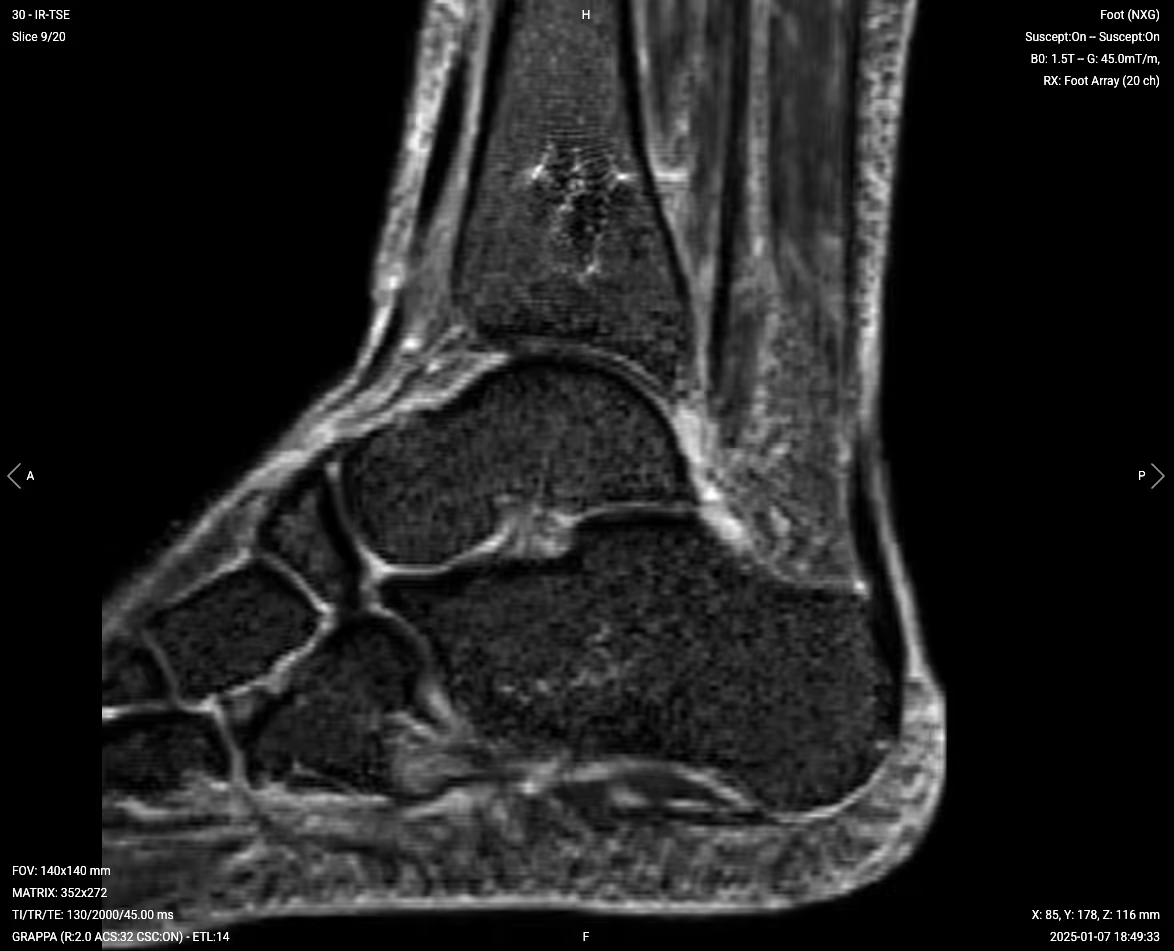
✅ Sagittal PD STIR – Correct Image Example:
Things to Look for in Sagittal PD STIR:
Bright signal indicating marrow edema or infection
Fluid collections around the implant
Soft tissue inflammation or abscess formation
Integrity of tendons and ligaments
✅ Coronal PD STIR – Correct Image Example:
Things to Look for in Coronal PD STIR:
Symmetric assessment of both malleoli
Fluid in joint spaces
Bone marrow edema patterns
Soft tissue swelling or inflammation
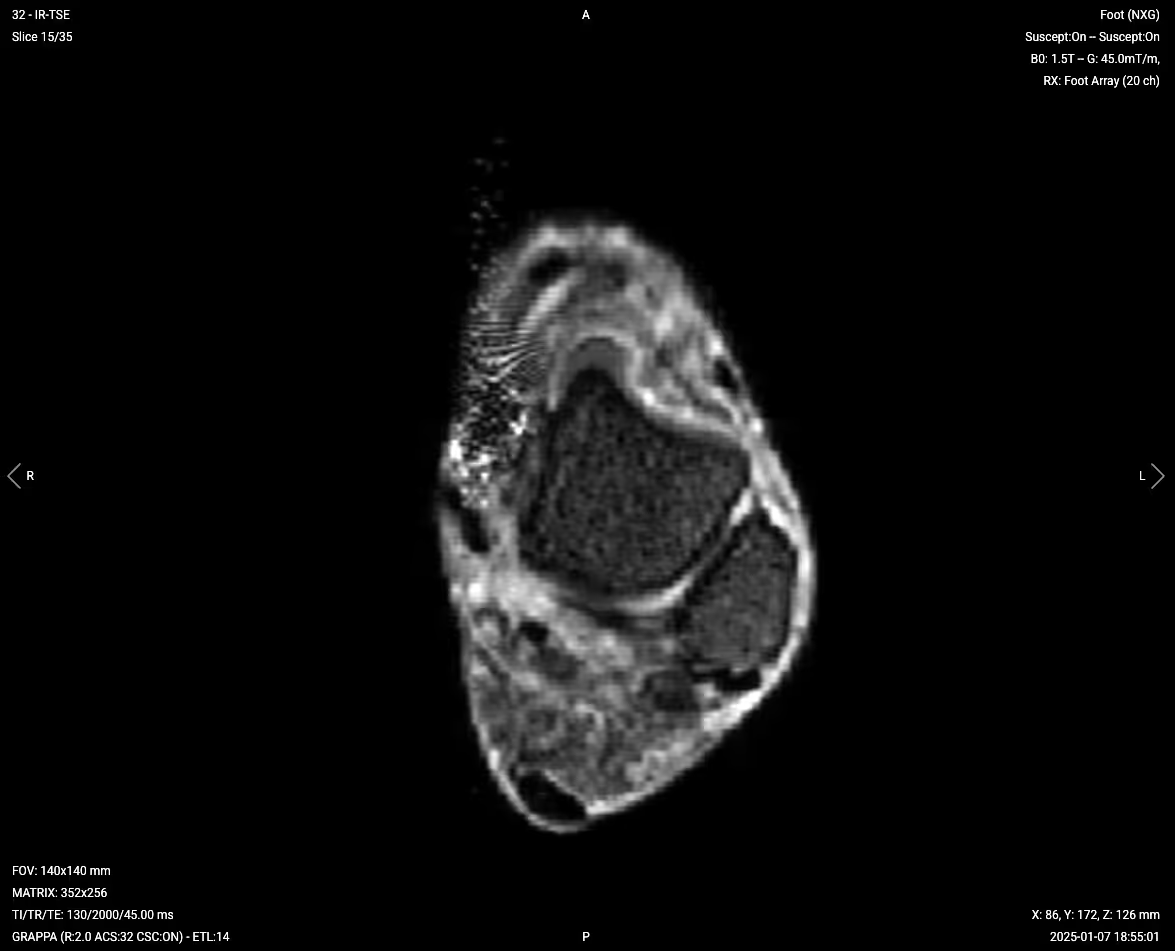
✅ Axial PD STIR – Correct Image Example:
Things to Look for in Axial PD STIR:
Cross-sectional view of implant position
Circumferential fluid collections
Soft tissue inflammation patterns
Tendon and ligament abnormalities
T2 TSE – Highlight Fluid and Soft Tissue Detail
T2-weighted imaging makes fluids appear bright. This contrast is ideal for tissues and abnormalities with high water content.
In ankle MRI with metal implants, T2 sequences help assess joint effusions, tendon tears, and ligament injuries. The bright fluid signal makes it easy to identify abnormal fluid collections that might indicate complications.
✅ Axial T2 TSE – Correct Image Example:
Things to Look for in Axial T2:
Joint effusions appearing bright
Tendon integrity and signal
Ligament tears or thickening
Cystic changes or fluid collections
Final Checks:
Before finishing an ankle MRI with metal implants, always check these 5 points to ensure diagnostic quality:
Metal Artifact Management: Ensure metal artifacts are minimized enough to visualize critical structures around the implant.
Bone-Implant Interface: The interface must be visible to assess for loosening or osteolysis.
Fluid Detection: STIR sequences must clearly show any abnormal fluid collections or marrow edema.
Soft Tissue Coverage: All sequences must adequately cover tendons, ligaments, and muscles around the ankle.
Image Quality: Images must have adequate SNR despite high bandwidth settings, with minimal motion or wraparound artifacts.
Bonus: Why Turbo Spin Echo with STIR Fat Suppression Is Best for Metal Implants
When scanning ankles with metal implants, not all sequence types handle artifacts equally well.
To understand why turbo spin echo (TSE) with STIR fat suppression is preferred, it helps to compare it directly to two common alternatives.
Test 1 – Turbo Spin Echo vs Gradient Echo
If you keep the same scan parameters (TR, TE, matrix, bandwidth, and geometry) and simply change the sequence type from turbo spin echo to gradient echo, the image quality changes significantly.
Turbo spin echo will typically show the ankle anatomy clearly, even close to the implant. The metal artifact is still present, but the structures around it are usually well-defined.
With gradient echo, however, the image near the metal often becomes unreadable. The artifact appears larger and more intense, and nearby anatomy may be completely obscured.
This happens because turbo spin echo includes refocusing pulses that correct many of the distortions caused by magnetic field variations around metal.
Gradient echo, however, lacks these pulses, so the artifacts appear stronger and cover more of the image.
Test 2 – STIR vs Spectral Fat Suppression
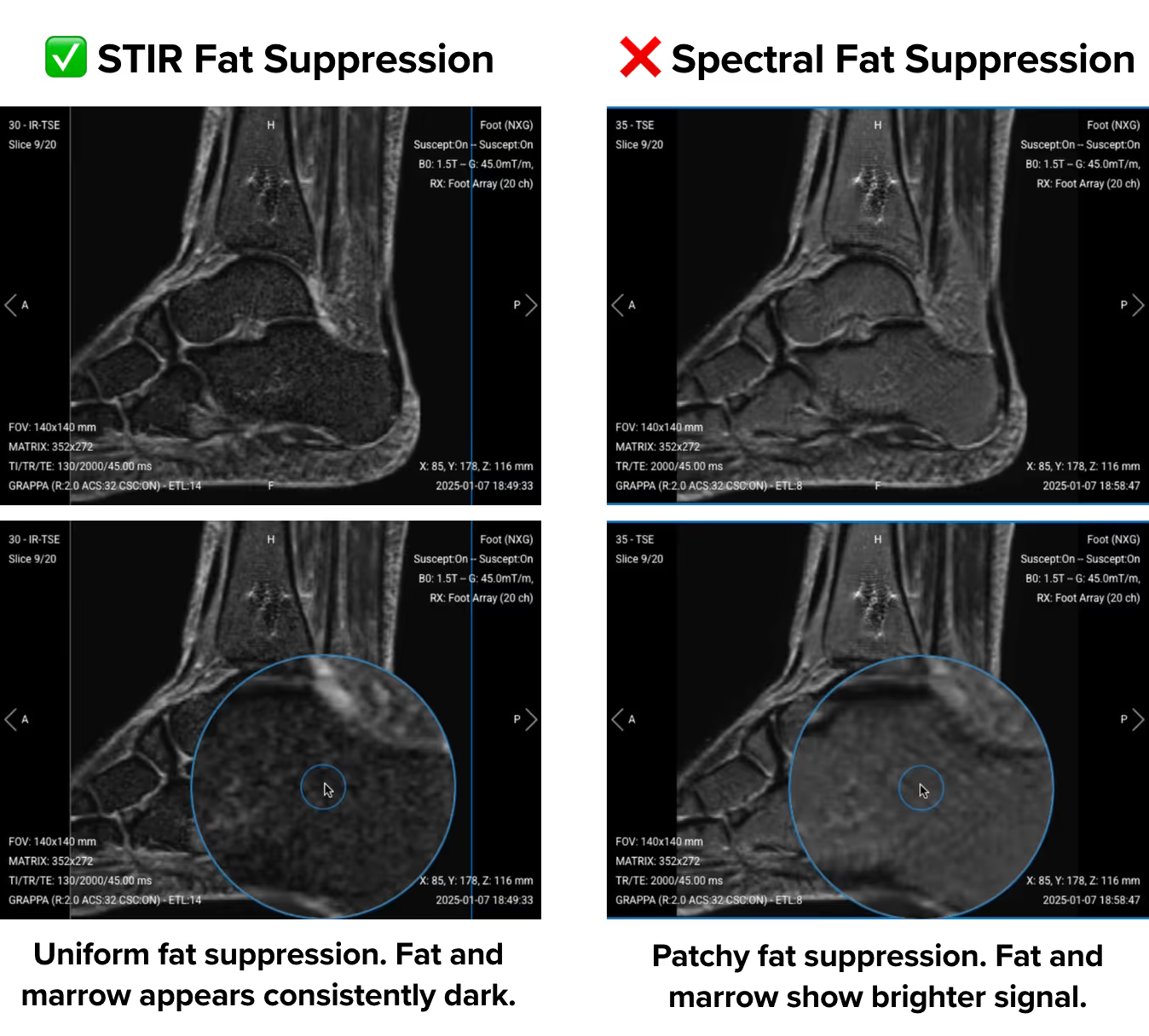
Now consider a sagittal PD sequence where all parameters stay the same, but you switch from STIR to spectral fat suppression.
With STIR, fat suppression remains even across the field of view. Bone marrow shows a uniform low signal, and subcutaneous fat appears consistently dark.
But with spectral fat suppression, the fat suppression may appear patchy. You might see bright signals remaining in bone marrow and subcutaneous fat, especially near the implant.
This difference is due to how the sequences work.
Spectral fat suppression works by identifying fat based on its frequency. It requires a uniform magnetic field to apply the suppression accurately. But metal implants disrupt that uniformity, which causes the technique to fail in some regions.
STIR works differently. It uses timing (inversion recovery) to suppress fat, not frequency. This allows STIR to perform more reliably in areas with magnetic field distortion, such as around metal implants.
This is why ankle MRI protocols with implants typically use TSE pulse sequences with STIR for fat suppression.
Turbo spin echo handles metal distortion better than gradient echo.
STIR fat suppression performs more reliably near metal than spectral fat suppression.
This combination helps reduce artifacts, improves visualization of soft tissues, and enables better diagnostic quality around implants.

.svg)